

Welcome to DISH, and thanks for visiting our page. Our Social Media team responds to your posts 7 days a week from 6a – 10p MT.
Englewood, CO
Joined May 2011
- Tweets341K
- Following10.5K
- Followers18.4K
- Likes256






@WolfspitNow Okay. We received your DM, but still unable to respond. We hear you, and we want to provide you a solution. Dish is grateful that you've been a long time customer, and we don't want things to end this way. -
3
2
1,110
Since we can't answer through here, please give us a call by dialing our customer service number: 1-800-333-3474, or try to reach out through chat or Facebook. So that we can assist you right away. spr.ly/6016ByGDOy
- JS
132
Hey John! When a Dish Network receiver states that its download or settings are out of date, it usually means the box has missed its scheduled nightly update or is experiencing a temporary software freeze.-
2
275
We know your time is important and hope everything is working now. If you need further assistance just send us a DM or visit our support page: spr.ly/6019ByDLeV
- JS
120
📺 Wondering whether your television setup requires a digital or analog converter box? Find the right equipment requirements for your TV in our official guide.
🔗 TV Converter Box FAQ: spr.ly/61847k1DM #DishAnswers

226
⏳ TAKE RECORDINGS WITH YOU
Requires a compatible DISH receiver & External Hard Drive.
📌 Transfers aren't instant. Large libraries can take days.
🔗 DVR Guide: spr.ly/6019BHzNs7
#DishAnswers #EHD #Transfers #DVR #Receiver

🧾 EVER SEE A PRORATED CHARGE ON YOUR BILL?
Prorated charges appear on your bill when a service or programming package is added to your account in the middle of a billing cycle.
#DishAnswers #ProratedCharges #Billing

260
🧾 EVER SEE A PRORATED CREDIT ON YOUR BILL?
Prorated credits appear on your bill when a service or programming package is removed from your account in the middle of a billing cycle.
#DishAnswers #Prorated #Credits #Billing

289
🎃 HALLOWEEN ON DISH:
Find comedy horror, family movies, and killer content via the DISH Spooktacular App.
🔗 App Details: spr.ly/6017BGL0fx
#DishAnswers #Spooktacular #Channel304

264
🔍 CAN'T FIND YOUR REMOTE?
For Hopper family receivers, find it in seconds:
➜ Press the Locate Remote button on your Hopper receiver to make your remote beep.
🔗 Receiver Settings Guide: spr.ly/6017BG59eJ
#DishAnswers #FindRemote #Hopper #Receiver

🔒 PARENTAL CONTROLS ON DISH
Control viewing permissions & protect your account from your remote!
✅ Hopper, Hopper w/ Sling, Duo, Hopper 3, Hopper Plus, Wally & all Joey models
🔗 Guide: spr.ly/6013BG59PZ
#DishAnswers #ParentalControls #Parents #Safety

❓ CAN MY RECEIVER USE MAGNIFICATION?
Magnification works on most Hopper and Joey receivers.
✅ Hopper, Hopper w/ Sling, Hopper 3, Duo, Super Joey, Joey 2.0/3.0, 4K & Wireless Joey
⚠️ Excludes: Hopper Plus, Joey 1.0
🔗 DISH Support: spr.ly/6012BGdXoo
#DishAnswers

1
287
📺 CUSTOMIZING YOUR GUIDE BANNER
Choose what displays on your Guide banner or show only tips and tricks.
🚨 Joey 4 & Hopper Plus: Android TV menus do not support banner customization.
🔗 Dish Support: spr.ly/6013BGdVTU
#DishAnswers

📺 Want to change how your DISH Guide looks? Personalize your layout in Settings:
✅ Text size
✅ Channel order (ascending or descending)
✅ Hide adult channels
✅ Notification banner
🔗 Hopper Settings Guide: spr.ly/6019BGR4Hf
#DishAnswers #Guide #Settings

🌐 NEED TO CHANGE YOUR MENU LANGUAGE?
Switch your DISH menu display between English and Spanish right from your remote.

ALT Graphic showing steps to change DISH menu language between English and Spanish using 40.0, 52.0, 54.x, or 60.0 remotes.
2
504
☑ Menu Language Guide:
→ spr.ly/6019B1AHfV
Step-by-step guidance for changing language settings on your DISH receiver.
170
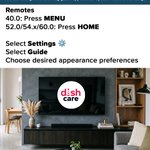
🎨 WANT TO CUSTOMIZE YOUR TV GUIDE LOOK?
You can change the appearance of your DISH menus and Guide directly from your remote!

ALT Graphic showing DISH Appearance Themes menu steps above a photo of a woman relaxing on a couch watching TV.
🔗 Visit our support page for more features and information: spr.ly/6014B1AHLj
#DishAnswers
1
115
WANT A CLEARER TV PICTURE?
Matching your TV resolution on your Hopper receiver ensures optimal picture clarity for your setup.
1/2

📱 DISH Anywhere has been updated!
✅ Single snapshot of recent & scheduled recordings
✅ Easy DVR sorting by show or movie
✅ Upgraded search that forgives minor typos
🔗 For more information, visit the DISH Anywhere App Update page: spr.ly/6010B1FXvr #DishAnswers #DISHApp

Need step-by-step help programming custom remote buttons or adjusting Closed Captioning? Check out the official DISH Accessibility Guide:
🔗 spr.ly/6012B1S2X2
Did you know you can customize Closed Captions on your DISH TV? 📺
Here is how to adjust your settings:
Press Home ➔ Settings ➔ DISH Settings ➔ Accessibility ➔ Closed Captioning
Customize your display preferences so text is easy to read!
(1/2)
1
206