Cloudback (@CloudbackIt) header
Cloudback (@CloudbackIt) profile picture

Cloudback is a cloud #backup #service for GitHub, GitLab, Azure DevOps and Linear. SOC 2 type II compliant, with CMEK and BYOS.

Ecuador, Quito
Joined July 2020
Photo by Cloudback (@CloudbackIt)Photo by Cloudback (@CloudbackIt)Photo by Cloudback (@CloudbackIt)Photo by Cloudback (@CloudbackIt)Photo by Cloudback (@CloudbackIt)Photo by Cloudback (@CloudbackIt)Photo by Cloudback (@CloudbackIt)Photo by Cloudback (@CloudbackIt)Photo by Cloudback (@CloudbackIt)Photo by Cloudback (@CloudbackIt)
Every repository in Cloudback has its own Settings card: whether backups are scheduled, when the next one runs, which schedule and storage it uses, and how long its backups are kept.
1
One IAM permission is all Cloudback strictly needs to back up your repositories to Amazon S3: s3:PutObject. The rest are optional, per feature: GetObject → restore DeleteObject → retention policy GetBucketLocation → endpoint auto-detect Grant only what you use. #AWS #DevOps
4
If a backup fails, the badge on your README should say so. Cloudback's backup status badge tracks the latest backup: green for succeeded, in progress, or scheduled. Red for failed. Grey for deleted or unknown. Embed it as an image URL or Markdown. #DevOps #GitHub
7
Cloudback has no invite step: access comes from GitHub, GitLab, Azure DevOps or Linear. Roles are Cloudback's own, set per account, and new users start as Global Admin. A Global Admin can change that on the User Roles page. #DevOps #Backup
4
Compliance review coming up? Each Cloudback platform view lists every repo, project, or workspace with its schedule, storage, retention policy, and last backup status. Filter it, then Export CSV to save exactly that view. #DevOps #Backup
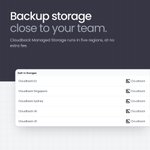
Cloudback Managed Storage sits in five regions: US (N. Virginia), EU (Amsterdam), UK (London), Sydney, and Singapore. New backups default to Cloudback US - switch to the nearest region at no extra fee in Repository Details. #DevOps #backup
1
5
Manage Cloudback backups without leaving your editor. The Cloudback MCP server (Docker image myrtlelabs/cloudback-mcp) wraps its Operations API, so in Claude Code, Cursor, or VS Code you ask: "Switch every repo with prod in the name to daily backups at 3 AM UTC." #DevOps #MCP
1
1
43
terraform apply, and your GitHub, GitLab, Azure DevOps, and Linear backup definitions are set. With the Cloudback Terraform provider, schedule, storage location, and retention policy live in the same repo as the rest of your infrastructure. #Terraform #IaC
15
Four ways to get your data back with Cloudback: download to your own machine, restore a single backup to any supported platform, bulk restore many repositories, or restore across platforms. #DisasterRecovery #DevOps
1
12
Cloudback shows deduplication per repository: backups processed, backups deduplicated, total size, and space saved - from Last Week to Last Year, with a donut and a bar chart. #DevOps #CloudStorage
5
In Cloudback's repository list, the State column shows whether each repo is backed up automatically: Scheduled or Not scheduled. Filter by Not scheduled to find any gaps, then fix them one repo at a time or in bulk with Bulk Operations. #DevOps
1
Set a custom backup schedule in Cloudback: open the Schedules page, click + Add a new schedule, name it, pick times in the Hour/Day/Month tabs (the cron expression is generated automatically), and Save. Then apply it in a repository's details. #DevOps #Backup
2
Before a risky repo transfer, trigger a manual Cloudback backup: select the repo and click Trigger. Manual backups go ahead of scheduled ones in the queue, so it starts as soon as possible. Follow it on the dashboard, then make the change. #DevOps #GitHub
17
Cloudback's Operations API reads a backup definition with one request and updates its schedule, storage and retention with another. The request shape is the same for GitHub, GitLab, Azure DevOps and Linear, authenticated with an X-API-Key header.
13
A finished status doesn't tell you what's inside a Linear backup. Cloudback's Workspace Details page lists exact counts: teams, projects, issues, comments, cycles, documents, labels, users, attachments, embedded files. #Linear
3
Cloudback backups of a Linear workspace download as a password-protected ZIP (AES-256). The built-in Windows ZIP handler doesn't do AES, so use 7-Zip. Inside: plain JSON in directories (issues, projects, comments) plus a metadata.json with counts. #Linear #DevOps
7
Add customer-managed storage (BYOS) in Cloudback: open Storages > Add a new storage, name it, pick a provider (Azure, S3, Google Cloud, Wasabi, OneDrive), set archive options. Cloudback moves the archive to your storage, then deletes its copy. #DevOps #backup
11
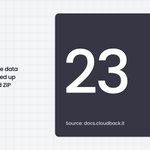
A Linear workspace holds more than tickets. It holds the planning structure around them. Cloudback backs up 23 data categories from a Linear workspace - issues, projects, documents, cycles, initiatives, embedded files - in one encrypted ZIP. #Linear #Backup
1
Cloudback uses two GitLab tokens, not one. Cloudback backs up with read-only read_api. The api write scope is in a separate token, requested only when you run a restore: create project, push repo, recreate issues and MRs. #GitLab #DevOps
6
Cloudback for Azure DevOps is on the Azure Marketplace, so repository backup goes on your existing Azure bill. Pick a plan by repo count: $10 per 10/month, $75 per 100, $500 per 1000. Stack units to cover more. #AzureDevOps
24