

Aspiring Ethical Hacker | Network Security | PenTesting & Recon | Learning, Practicing, Sharing
Joined February 2026
- Tweets2.8K
- Following127
- Followers415
- Likes9.7K




Honestly, I genuinely feel that sales is a very important non-technical skill people should master. 🤔
Not "Hard selling" 😄, but being able to explain what you've found and why it matters in a way that gets someone to actually care enough to fix it.
What do you think?

Day 138 of my #EthicalHacking journey. 🐧
Yesterday, I dove deeper into #Wireshark, learning two different filtering syntaxes.
1. BPF (Berkeley Packet Filter) – Used in Capture Filters to determine what traffic Wireshark captures.
Examples:
- "tcp port 80" – Capture TCP traffic on port 80.
- "icmp" – Capture ICMP traffic.
- "udp port 53" – Capture UDP traffic on port 53.
I also discovered that ICMP isn't just about ping! There are different message types, including type 17, 8, 3 and 0. 😅
2. Wireshark Display Filter Syntax – Used to filter traffic that has already been captured.
Examples:
- "dns" – Show DNS traffic.
- "tcp" – Show TCP traffic.
- "tcp.flags.syn == 1" – Show packets with the SYN flag set.
- "frame.len > 1000" – Show packets larger than 1,000 bytes.
I also explored Protocol, Application, Field Existence and Characteristics filters, which introduced me to something called BOOTP.
Honestly, Field Existence and Characteristics filters gave me the hardest time.
Still learning, still figuring things out. One packet at a time. 😄


CYBERGEZ retweeted
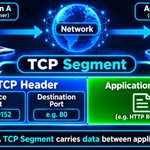
Packet vs Frame vs Segment: What's the difference? 🤔
You’ll often hear these three terms when studying network traffic, especially in #Wireshark.
They are related, but they don't mean the same thing.
Think of them as layers of a package:
Packet vs Frame vs Segment: What's the difference? 🤔
You’ll often hear these three terms when studying network traffic, especially in #Wireshark.
They are related, but they don't mean the same thing.
Think of them as layers of a package:
The Data (Payload)
It's the actual information being carried.
For example, when you visit a website, your browser might send an HTTP request.
That request is application data carried inside a TCP segment, which is inside an IP packet, which is inside a frame.
It's like opening a package and finding another package inside!

1
6
39
Putting Everything Together
Here's the relationship:
Frame → Packet → Segment → Data
Each layer adds its own information to help move data across a network.
And this is one reason Wireshark is so interesting.
You can capture traffic and expand these sections to see how the different layers are structured.
Once you understand this, reading packets in #Wireshark becomes a lot less confusing.

1
7
43
CYBERGEZ retweeted
Day 137 of my #EthicalHacking journey 🐍
Yesterday, I spent some time exploring #Python, particularly a module called "zipfile", which allows me to work with ZIP archives programmatically. I explored how to create, open, extract and manage compressed files.
Out of curiosity, I also decided to explore "send2trash". What caught my attention was that instead of permanently deleting files, it sends them to the system's recycle bin or trash, just like when you normally delete something through the GUI.
Didn't cover much yesterday, but I still got to explore something new and understand how these modules work.
Not every day has to be packed with new concepts. Some days are just about getting a little further than you were yesterday. 😄
The journey continues!


Day 136 of my #EthicalHacking journey
Today, I dove deeper into Python and explored three libraries:
- os: For interacting with the operating system, working with files, directories and paths.
- shutil: For high-level file operations like copying, moving and deleting files.
- shelve: For storing and retrieving Python objects using a file-based database.
I also explored some of their functions, including "os.path.isfile()", "shelve.open()" and "shutil.move()".
I'm considering building a project that brings everything together. Still putting the pieces together, but I think it'll be a fun one. 😄


CYBERGEZ retweeted
Honestly, one thing I still don't understand is the excitement around having a touchscreen laptop as someone going into cybersecurity. 😂
I've come across people in the field who are genuinely happy they spent extra to get a touchscreen laptop.
Meanwhile, I'm here wondering... what exactly are you touching? 😂
Day 138 of my #EthicalHacking journey. 🐧
Yesterday, I dove deeper into #Wireshark, learning two different filtering syntaxes.
1. BPF (Berkeley Packet Filter) – Used in Capture Filters to determine what traffic Wireshark captures.
Examples:
- "tcp port 80" – Capture TCP traffic on port 80.
- "icmp" – Capture ICMP traffic.
- "udp port 53" – Capture UDP traffic on port 53.
I also discovered that ICMP isn't just about ping! There are different message types, including type 17, 8, 3 and 0. 😅
2. Wireshark Display Filter Syntax – Used to filter traffic that has already been captured.
Examples:
- "dns" – Show DNS traffic.
- "tcp" – Show TCP traffic.
- "tcp.flags.syn == 1" – Show packets with the SYN flag set.
- "frame.len > 1000" – Show packets larger than 1,000 bytes.
I also explored Protocol, Application, Field Existence and Characteristics filters, which introduced me to something called BOOTP.
Honestly, Field Existence and Characteristics filters gave me the hardest time.
Still learning, still figuring things out. One packet at a time. 😄
CYBERGEZ retweeted

I find it funny 😂😂
They think they will use the touch screen while monitoring logs😂
Honestly, one thing I still don't understand is the excitement around having a touchscreen laptop as someone going into cybersecurity. 😂
I've come across people in the field who are genuinely happy they spent extra to get a touchscreen laptop.
Meanwhile, I'm here wondering... what exactly are you touching? 😂
Day 138 of my #EthicalHacking journey. 🐧
Yesterday, I dove deeper into #Wireshark, learning two different filtering syntaxes.
1. BPF (Berkeley Packet Filter) – Used in Capture Filters to determine what traffic Wireshark captures.
Examples:
- "tcp port 80" – Capture TCP traffic on port 80.
- "icmp" – Capture ICMP traffic.
- "udp port 53" – Capture UDP traffic on port 53.
I also discovered that ICMP isn't just about ping! There are different message types, including type 17, 8, 3 and 0. 😅
2. Wireshark Display Filter Syntax – Used to filter traffic that has already been captured.
Examples:
- "dns" – Show DNS traffic.
- "tcp" – Show TCP traffic.
- "tcp.flags.syn == 1" – Show packets with the SYN flag set.
- "frame.len > 1000" – Show packets larger than 1,000 bytes.
I also explored Protocol, Application, Field Existence and Characteristics filters, which introduced me to something called BOOTP.
Honestly, Field Existence and Characteristics filters gave me the hardest time.
Still learning, still figuring things out. One packet at a time. 😄
CYBERGEZ retweeted
Day 138 of my #EthicalHacking journey. 🐧
Yesterday, I dove deeper into #Wireshark, learning two different filtering syntaxes.
1. BPF (Berkeley Packet Filter) – Used in Capture Filters to determine what traffic Wireshark captures.
Examples:
- "tcp port 80" – Capture TCP traffic on port 80.
- "icmp" – Capture ICMP traffic.
- "udp port 53" – Capture UDP traffic on port 53.
I also discovered that ICMP isn't just about ping! There are different message types, including type 17, 8, 3 and 0. 😅
2. Wireshark Display Filter Syntax – Used to filter traffic that has already been captured.
Examples:
- "dns" – Show DNS traffic.
- "tcp" – Show TCP traffic.
- "tcp.flags.syn == 1" – Show packets with the SYN flag set.
- "frame.len > 1000" – Show packets larger than 1,000 bytes.
I also explored Protocol, Application, Field Existence and Characteristics filters, which introduced me to something called BOOTP.
Honestly, Field Existence and Characteristics filters gave me the hardest time.
Still learning, still figuring things out. One packet at a time. 😄
Day 137 of my #EthicalHacking journey 🐍
Yesterday, I spent some time exploring #Python, particularly a module called "zipfile", which allows me to work with ZIP archives programmatically. I explored how to create, open, extract and manage compressed files.
Out of curiosity, I also decided to explore "send2trash". What caught my attention was that instead of permanently deleting files, it sends them to the system's recycle bin or trash, just like when you normally delete something through the GUI.
Didn't cover much yesterday, but I still got to explore something new and understand how these modules work.
Not every day has to be packed with new concepts. Some days are just about getting a little further than you were yesterday. 😄
The journey continues!
CYBERGEZ retweeted
One extra thing I am learning as I go deeper into web application is the ability to pay details to every information (response) you get from an application 🔍 some may lead to a dead end but most ignored signs and response leads to a possible exploit.
Yesterday I got stuck solving this lab because I didn’t pay attention to the response the application was returning 😅
While exploiting XXE to perform SSRF attack I was to locate a metadata endpoint, then the parser will pull the sensitive information, so all I had to do was point the parser to the right endpoint.
I created the DTD, created the entity and pointed it to the metadata default URL but something was missing, the endpoint that had the sensitive information needed.
When I made reference to the entity in the child element at first I didn’t see anything that looked like sensitive information, I spent sometime checking my payload and the structure over and over if there was something wrong till eventually I stopped and ended for the day 🛑
Today I opened that lab again and while looking at the response I caught something 👀 the metadata service was returning its directory structure one path segment at a time, then you use that to build the full endpoint, at the first request the application reveal the first part of the endpoint “latest” add this known endpoint to your URL and send the request the application will reveal the next endpoint, with this finding I was able to build the full URL for the metadata endpoint and view sensitive data about that metadata instance 🎯
When a response doesn’t match what you expect, don’t just re-check your payload, re-check your assumption that the response is useless. Sometimes the app is already telling you the next step.
Solved another lab depending fully on my knowledge without using the solution button.


Today I started hands on lab on XXE injection and I just solved the first lab
The application sends an XML request whenever a user wants to check a product stock availability.
Going back to my theory lessons the 1 out of the 3 conditions that makes an XXE injection possible was present
The application accepting XML from the user
I modified the XML that was being sent to the server, added a DTD created an entity and pointed that entity to a file path on the server
The parser processes the DTD and resolved the external entity, This was also tied back to my theory, for an XXE injection to be possible the application must accept XML from the user, process the DTD and resolve the external entities, all conditions were present in this lab.
Creating a DTD and an external entity I was able to solve the lab and read the file content of /etc/passwd.
XML and XXE are legitimate process, it goes wrong when the application start accepting XML from the user, processing the DTD and resolve external entities blindly

Day 138 of my #EthicalHacking journey. 🐧
Yesterday, I dove deeper into #Wireshark, learning two different filtering syntaxes.
1. BPF (Berkeley Packet Filter) – Used in Capture Filters to determine what traffic Wireshark captures.
Examples:
- "tcp port 80" – Capture TCP traffic on port 80.
- "icmp" – Capture ICMP traffic.
- "udp port 53" – Capture UDP traffic on port 53.
I also discovered that ICMP isn't just about ping! There are different message types, including type 17, 8, 3 and 0. 😅
2. Wireshark Display Filter Syntax – Used to filter traffic that has already been captured.
Examples:
- "dns" – Show DNS traffic.
- "tcp" – Show TCP traffic.
- "tcp.flags.syn == 1" – Show packets with the SYN flag set.
- "frame.len > 1000" – Show packets larger than 1,000 bytes.
I also explored Protocol, Application, Field Existence and Characteristics filters, which introduced me to something called BOOTP.
Honestly, Field Existence and Characteristics filters gave me the hardest time.
Still learning, still figuring things out. One packet at a time. 😄
Day 137 of my #EthicalHacking journey 🐍
Yesterday, I spent some time exploring #Python, particularly a module called "zipfile", which allows me to work with ZIP archives programmatically. I explored how to create, open, extract and manage compressed files.
Out of curiosity, I also decided to explore "send2trash". What caught my attention was that instead of permanently deleting files, it sends them to the system's recycle bin or trash, just like when you normally delete something through the GUI.
Didn't cover much yesterday, but I still got to explore something new and understand how these modules work.
Not every day has to be packed with new concepts. Some days are just about getting a little further than you were yesterday. 😄
The journey continues!
CYBERGEZ retweeted
If you could go back to your first days of learning cybersecurity, what's one thing you would do differently?
Or what's something you wish someone had told you earlier?
I'd love to hear from you. Someone starting out might also need to hear it. 👇🏾
Day 137 of my #EthicalHacking journey 🐍
Yesterday, I spent some time exploring #Python, particularly a module called "zipfile", which allows me to work with ZIP archives programmatically. I explored how to create, open, extract and manage compressed files.
Out of curiosity, I also decided to explore "send2trash". What caught my attention was that instead of permanently deleting files, it sends them to the system's recycle bin or trash, just like when you normally delete something through the GUI.
Didn't cover much yesterday, but I still got to explore something new and understand how these modules work.
Not every day has to be packed with new concepts. Some days are just about getting a little further than you were yesterday. 😄
The journey continues!