

3d artist & art director 🪽་༘࿐ tutorials: https://xitter.cf/t.co/6zLY0bZ3ma work: [email protected]
Joined July 2019
- Tweets21K
- Following414
- Followers57.8K
- Likes68K




Pinned Tweet
im abel, a 3d artist, animator, and occasional jewelry designer who makes shiny stuff in pink blender
if you enjoy my work, you can support me by subscribing to my patreon!
patreon.com/archfiendco
🫶🏽🏹 🐚


𝕬𝖇𝖊𝖑☆ retweeted

Heres 10 people that make sick stuff to checkout :
@sick_again_
@FIEND___
@kitamerin
@RAWECORPPP
@OddBallRugz
@AstralWytch
@madebyajit
@snakdraws
@natesulIivan
@tristle


Here's how I turned one of my fave artworks into a filter for all my other artworks using @figmaweave ! [🧵]
🤝 Paid partnership


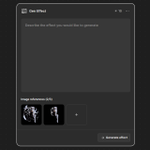
Now I just plug any artwork into the Gen Effect node, add an Export node on the output and done! It works on video too 🎥

Workflow is open for you to play with! Can't wait to see what you build with it 🤍
You can also use code ABEL20 for 20% off your first Figma Weave subscription: bit.ly/3VJcYYJ


3- Topaz Sharpen
a tool designers and photo editors have trusted for years, now built into Weave. Fixes blurry, soft images without that plastic look. No extra app needed!

7- Compositor and basically the entire editing section in Toolbox:
layers, masks, blends, color grading, the whole gang. Works on videos too! Super easy to pick up and way too fun to experiment with

Here's my @figmaweave file with all the nodes + workflows I mentioned in this thread! Open it up, poke around and see what you can make 😊
You can also use code ABEL20 for 20% off your first month or year of a Figma Weave subscription:
bit.ly/4sb7WQB

5- Gen Effect
describe the vibe you want and it builds the effect for you. No coding or plugin hunting, just type it out and apply it to your image or video. Super fun to play with!


2- Vectorizer
turns a flat image into clean vector shapes you can scale forever and edit. Got a blurry logo, artwork or sketch you scanned? Fixed. Huge lifesaver for designers!

1- Figma Node
bring your Figma designs in, play with them, send them back. Here is a great example on how you can hundreds of on-brand variants with one figma design! youtube.com/watch?v=fvelvgiA…
