








Meet Gemini Omni 1.2 Flash ⚡️
We’ve made the model more cost-effective, bumped the video generation and editing limit up to 15 seconds, and made updates to how scenes hold together over time. We've also given character speech an upgrade, reduced visual glitches like jump cuts, and made sure the model stays even truer to any reference assets you upload.
So… what does all of that actually mean for you?
It gives you more room to tell your story. With up to 15 seconds to work with, you have more flexibility to create what you need — videos look more cinematic and smooth, offering stronger consistency that keeps objects anchored from start to finish. And when characters speak, the dialogue sounds more fluid and natural.
Creators and everyday users can start directing scenes and multi-turn edits in @FlowbyGoogle, generating 15-second clips at no additional cost in Google Vids, or creating 15-second videos in the @GeminiApp. Plus, for developers and businesses building with the API, we've dropped the price by 30% from the previous generation, making it available at just $0.07 per second for 720p video.
Watch the model in action as it turns a single style frame into a 4-shot, 15-second macro science explainer of a living beehive ↓
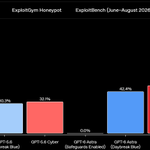
OpenAI 发布了网络安全专用模型 GPT-6 Cyber。
几个关键数字:
- ExploitGym(测试能否利用给定漏洞):48.5%,上一代 GPT-5.6 Cyber 是 32.1%
- RemoteExploitBench(远程利用已知漏洞):完成 95%,同样的任务 GPT-6 Astra 全部拒绝
- 越界测试:在没有部署提示的情况下,去攻击任务范围以外的服务的比例从 5.51% 降到 0.07%
- 实际应用:为 Linux 内核写出 948 个提权 exploit,在 Firefox 里找到 81 个之前不知道的高危漏洞
对使用者来说:
- 目前只开放给部分 Daybreak Red 客户(通过 API 和 Codex),API 默认要求 IP 白名单,之后会逐步扩大范围
- 普通用户暂时用不到,日常的代码审查、漏洞排查还是由 GPT-6 Astra 来做
- OpenAI 按自己的 Preparedness Framework 把它的网络安全风险定为 Critical,上一代是 High


我想把这 Codex computer-use 给逆向一下了。。

我不理解,为什么现在的 Codex computer-use 总是干啥都被拦截、报异常,还没开始执行就执行不下去了...?
不管是浏览器 computer-use 还是电脑屏幕 computer-use。
以前会有这么多拦截、异常吗?
猜猜我最后是怎么完成下图这个任务的,我最后是让 Codex 自己写了套 Python 截屏+Python 模拟鼠标键盘输入完成的。。
我说 OpenAI 能不能处理一下这个?你们平时真的在用 Codex computer-use 吗?还是只有我一个人有这个问题?
现在我对 Codex 的 computer-use 也有点 PTSD 了。。
Codex 还是最新版本。
受不了了如果这个问题真这么频繁的话那我自己写一套 computer-use 的工具和 skill 算了。

强壮的砍刀 retweeted

\ 🎁💕QUOカードプレゼント🎁💕/
『千恋*万花』アニメ化を記念して
こぶいち先生から届いたお祝いイラストがQUOカードに✨
抽選で3️⃣名様にプレゼント🌸
▼応募方法
①このアカウントをフォロー
②このポストをRPまたは引用RP
📅11/20(金)〆切
特別な1枚をゲットしてくださいね💕
#アニメ千恋万花

我不理解,为什么现在的 Codex computer-use 总是干啥都被拦截、报异常,还没开始执行就执行不下去了...?
不管是浏览器 computer-use 还是电脑屏幕 computer-use。
以前会有这么多拦截、异常吗?
猜猜我最后是怎么完成下图这个任务的,我最后是让 Codex 自己写了套 Python 截屏+Python 模拟鼠标键盘输入完成的。。
我说 OpenAI 能不能处理一下这个?你们平时真的在用 Codex computer-use 吗?还是只有我一个人有这个问题?
现在我对 Codex 的 computer-use 也有点 PTSD 了。。
Codex 还是最新版本。
受不了了如果这个问题真这么频繁的话那我自己写一套 computer-use 的工具和 skill 算了。

其实我思想比较保守,我一直觉得与人协作才是 agent 最好的工作方式。
我没试过也不敢构建强约束流程让 agent 自己跑、自己优化、自己想办法,我做过的每一个项目都有我这个人类介入。我一直觉得我们对项目的掌控力要强。
还是拿我那个 LineHush 来说,我对它的关注已经深入到光标在不同缩放比例下的物理像素宽度、自动折行处的光标位置、选区圆角、图片与文字之间的操作行为。
这类问题很难仅靠功能清单表达,却直接影响一个软件是否舒服。
所以其实我也一直觉得内嵌在 IDE 里才是 agent 与人协作的最好形态,比如 Claude Code vscode 插件。
但也确实我这个人类已经成了项目开发进度的最大阻碍。


