

The Digital Learning Department supports student and staff through professional learning, program support, and curricular support.
Rosenberg, TX
Joined May 2014
- Tweets783
- Following53
- Followers1K
- Likes81
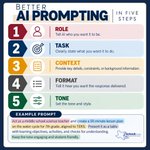






Ever ask AI for something and think, "Well, that's not quite what I had in mind. Try these five simple ingredients:
1. Role: Who should AI be?
2. Task: What should it do?
3. Context: What does it need to know?
4. Format: How should it respond?
5. Tone: How should it sound?

Data is everywhere, and students need to know what to do with it! Strand 3 challenges students to move beyond simply collecting information to organizing, analyzing, and representing data to make informed decisions. The goal? Turn data into understanding!
#LCISDDigitalLearning

Need to get organized? Think of OneNote as your digital binder, but better! Organize lessons, collect resources, take notes, and collaborate with colleagues or students, all in one place. #LCISDDigitalLearning #MicrosoftMagic

When dealing with Canvas assignments and quizzes, there is an option in the gradebook that lets you quickly message all students in your course who have not "turned it in". Check out how here: bit.ly/4d4Bo1C. #WeAreLamarCISD

Think of a Digital Content Studio as a second teacher in the classroom. Adaptive programs, educational videos with practice, data collection, and other digital tools can help students strengthen skills and address learning gaps. #WeAreLamarCISD

Every student in Progress Learning automatically gets a Study Plan for every rostered subject. No diagnostic. No teacher assignments. As students work, Focus Areas identify standards needing support and create a customized learning path for growth. #WeAreLamarCISD

✨ Canva’s AI image generator has a new home!
Looking to turn your ideas into images? Follow this path in Canva:
👉 Apps → Magic Media → Generate
Describe the image you want to create and let your imagination lead the way!
#CanvaTips #DigitalLearning #AIinEducation

See that little Copilot button? 👀Look in the bottom-right corner of your Word document.
1. Click the Copilot icon
2. Tell it what you want to edit
3. Let Copilot work in your document
#LCISDDigitalLearning #AIinAction

This week we are spotlighting strand two of the Technology Applications TEKS. How are your students using creativity and innovation in your classroom? #TATEKSSpotlight #LCISDDigitalLearning

Wish you could be in two places at once? With PowerPoint’s Record feature, you can! Record yourself explaining, modeling reviewing, or walking students through a task, and then let students access your instruction while pulling a small group.#LCISDDigitalLearning #MicrosoftMagic

No access to create a KickUp session? Complete the KickUp Live Session Form and share it with your campus session creators. Download: bit.ly/4yS1iRC

Digital literacy matters more than ever! Learn how to help students navigate the online world with ready-to-use 20-minute lessons from Common Sense Media. Resources: bit.ly/48aJOFg | Earn 2 Tech CEU hours: bit.ly/4hwZyHo #WeAreLamarCISD

Help students take ownership of their learning with Progress Learning trackers! Start tracking growth today. Download: bit.ly/4yQ4Kw6 #WeAreLamarCISD

Teachers, this one was built with you in mind! The "Teach" tab in Copilot provides educator tools to help you refine plans, quizzes, rubrics, flashcards, and more, from one convenient space. Use with your district curriculum!
#LCISDDigitalLearning #AIinAction

Computational thinking is a powerful way to help students become strategic problem-solvers! How?
-Decompose a big problem
- Recognize patterns & make predictions
- Generalize the mportant information
- Design an algorithm or step-by-step solution
#LCISDDigitalLearning #TATEKS

Microsoft Magic Pro Tip: In Word (Online), simply paste a supported video URL on its own line and press Enter. Word will embed the video so students can watch it without leaving the document!
#LCISDDigitalLearning #MicrosoftMagic

Canva Staff & Admin Users: Please do not invite students to the Staff & Admin Canva Team, as it is for staff only. Any student invited will be removed. Learn more about sharing designs with students here: bit.ly/3V3t5ju

Keep assessments secure with Proctor Mode! Enable it on individual assignments to lock students into the test and automatically secure the activity if they leave. bit.ly/4AhK8hy #WeAreLamarCISD

Try adding “Before you answer…” to your next AI prompt.
Ask AI to identify misconceptions, consider student struggles, find missing information, or question its assumptions before creating a response.
Small prompt change. Much better thinking.
#LCISDDigitalLearning #AIinAction

TA TEKS Spotlight: Meet the Strands!
The TA TEKS help students think, create, collaborate, analyze, and navigate the digital world responsibly
These skills don’t stand alone; they fit naturally into learning across content areas!
#LCISDDigitalLearning #TATeks
