

Hands-on reviews of tools and tech, tested on everyday hardware. Real-world performance, practical trade-offs, and the occasional surprise.
- Tweets269
- Following250
- Followers67
- Likes94






ALT OCR Cup standings after 13 matches, same 33 test pages on an M4 Mac with 16 GB, offline. Columns: scan-like character errors, invoice rows exact out of 48, time a page, record. GLM-OCR 0.9B (champion) 0.15%, 48, 5.89 s, 11 wins. Surya 2.5 0.14%, 48, 15.78 s. MiniCPM-OCR 1.0 0.29%, 42, 10.5 s. DeepSeek-OCR 0.41%, 48, 7.58 s. LightOnOCR-2-1B 0.69%, 48, 12.2 s. Indra 1.1.2 0.74%, 47, 142 ms. Indra 1.2.0 (new) 0.87%, 47, 166 ms, 1 loss. Apple Vision 1.33%, 36, 448 ms. dots.ocr 1.35%, 48, 75.2 s. Tesseract 5.5.4 1.89%, 27, 663 ms. docTR 1.1.0 5.10%, 44, 3.81 s. RapidOCR 3.10.0 15.83%, 36, 1.45 s. PaddleOCR 3.7.0 19.28%, 37, 15.96 s. EasyOCR 1.7.2 23.02%, 21, 2.70 s.


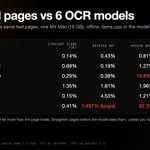
ALT Cheat sheet, crooked pages vs 6 OCR models, character errors on the same test pages, one M4 Mac with 16 GB, offline. Columns: straight scans (10 pages), rotated 90 degrees, upside down, tilted 20 degrees. Surya 2.5: 0.14%, 0.43%, 0.81%, 0.05%. LightOnOCR-2-1B: 0.69%, 0.19%, 1.27%, 0.95%. MiniCPM-OCR 1.0: 0.29%, 0.38%, 19.84% (red), 0.18%. dots.ocr: 1.35%, 1.81%, 1.96%, 50.3% (red). GLM-OCR 0.9B: 0.15%, 4.53%, 1.21%, 5.23%. DeepSeek-OCR: 0.41%, 1,497% loops (red), 92.3% (red), 1,362% loops (red). Note: over 100% means the model wrote far more than the page holds; straighten pages before the model sees them, unless you run Surya or LightOnOCR.

ALT OCR Cup standings after 12 matches, same 33 test pages on an M4 Mac with 16 GB, offline. Columns: scan-like character errors, invoice rows exact out of 48, time a page, record. GLM-OCR 0.9B (champion) 0.15%, 48, 6.25 s, 10 wins. Surya 2.5 0.14%, 48, 15.78 s. MiniCPM-OCR 1.0 0.29%, 42, 10.5 s. DeepSeek-OCR 0.41%, 48, 7.58 s. LightOnOCR-2-1B 0.69%, 48, 12.2 s. Indra 1.1.2 0.74%, 47, 142 ms. Apple Vision 1.33%, 36, 448 ms. dots.ocr (new) 1.35%, 48, 75.2 s, 1 loss. Tesseract 5.5.4 1.89%, 27, 663 ms. docTR 1.1.0 5.10%, 44, 3.81 s. RapidOCR 3.10.0 15.83%, 36, 1.45 s. PaddleOCR 3.7.0 19.28%, 37, 15.96 s. EasyOCR 1.7.2 23.02%, 21, 2.70 s.

ALT Left, a Python-docs test page tilted 20 degrees. Right, what dots.ocr returned: "The potential uses for metaclasses are boundless. Some ideas that have been explored include enum," then, underlined in red, "do. This object is then asked to produce the attribute whose name is the identifier." which belongs to another line; then "When an exception is not handled at all, the interpreter terminates execution of the program" followed in red by "logging, interface checking, automatic delegation, automatic property creation, proxies, frameworks, and automatic resource locking/synchronization." from another line, twice. Two paragraphs came out twice; a sentence on the page never came out. Below: 461 words out for 337 on the page; 264 seconds on one page, 7,993 prompt tokens; character errors on this page 50.3% vs GLM-OCR's 5.23%.

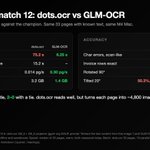
ALT Results card, OCR Cup match 12 on an M4 Mac, dots.ocr vs GLM-OCR. Speed: one page at a time 75.2 s vs 6.25 s; dots.ocr with pages at half size 15.2 s; batch with 10 slots 0.014 vs 0.30 pages per second; model files 3.2 GB vs 1.4 GB. Accuracy: scan-like character errors 1.35% vs 0.15%; invoice rows exact 48 of 48 each; rotated 90 degrees 1.81% vs 4.53%; tilted 20 degrees 50.3%, lines mixed, vs 5.23%. GLM-OCR keeps the title 2-0 with a tie; dots.ocr turns each page into about 4,800 image tokens, 12 times slower.

ALT OCR Cup standings after 11 matches, same 33 test pages on an M4 Mac with 16 GB, offline. Columns: scan-like character errors, invoice rows exact out of 48, time a page, record. GLM-OCR 0.9B (champion) 0.15%, 48, 5.86 s, 9 wins. Surya 2.5 0.14%, 48, 15.78 s. MiniCPM-OCR 1.0 0.29%, 42, 10.5 s. DeepSeek-OCR (new) 0.41%, 48, 7.58 s, 1 loss. LightOnOCR-2-1B 0.69%, 48, 12.2 s. Indra 1.1.2 0.74%, 47, 142 ms. Apple Vision 1.33%, 36, 448 ms. Tesseract 5.5.4 1.89%, 27, 663 ms. docTR 1.1.0 5.10%, 44, 3.81 s. RapidOCR 3.10.0 15.83%, 36, 1.45 s. PaddleOCR 3.7.0 19.28%, 37, 15.96 s. EasyOCR 1.7.2 23.02%, 21, 2.70 s.

ALT Left, a Python-docs test page turned 90 degrees. Right, what DeepSeek-OCR returned: "Notes 01" and the first sentence with one misread ("objective" for "object"), then three paragraphs that drift away from the page, then the sentence "A function that takes a number as its argument and returns the number raised to the power of 2." repeated 340 times, underlined in red; that sentence is not on the page. Below: 33,618 characters out for 2,122 on the page; 75 seconds on one page, cut off by the 8,192-token limit; character errors on this page 1,497% vs GLM-OCR's 4.53%.

ALT Results card, OCR Cup match 11 on an M4 Mac, DeepSeek-OCR vs GLM-OCR. Speed: one page at a time 7.58 s vs 5.86 s; batch of 330 pages with 10 slots 0.11 vs 0.30 pages per second, with 4 slots 0.11 vs 0.27; model files 3.6 GB vs 1.4 GB. Accuracy: scan-like character errors 0.41% vs 0.15%; invoice rows exact 48 of 48 each; rotated 90 degrees: DeepSeek-OCR loops, 1,497% vs 4.53%; tilted 20 degrees: loops, 1,362% vs 5.23%. GLM-OCR keeps the title 2-0 with a tie.


ALT OCR Cup standings after 10 matches, same 33 test pages on an M4 Mac with 16 GB, offline. Columns: scan-like character errors, invoice rows exact out of 48, time a page, record. GLM-OCR 0.9B (champion) 0.15%, 48, 5.83 s, 8 wins. Surya 2.5 0.14%, 48, 15.78 s. MiniCPM-OCR 1.0 0.29%, 42, 10.5 s. LightOnOCR-2-1B (new) 0.69%, 48, 12.2 s, 1 loss. Indra 1.1.2 0.74%, 47, 142 ms. Apple Vision 1.33%, 36, 448 ms. Tesseract 5.5.4 1.89%, 27, 663 ms. docTR 1.1.0 5.10%, 44, 3.81 s. RapidOCR 3.10.0 15.83%, 36, 1.45 s. PaddleOCR 3.7.0 19.28%, 37, 15.96 s. EasyOCR 1.7.2 23.02%, 21, 2.70 s.

ALT A crop of a scan-like test page from the Python docs: "A code object can be executed or evaluated by passing it (instead of a source string) to the 'exec()' or 'eval()' built-in functions." Below it, what LightOnOCR-2-1B returned: the same sentence with `exec()` and `eval()` in markdown backticks, underlined in red. Pages with backticks: 11 of 20 prose pages. Character errors on scan-like pages as returned: 0.69% vs GLM-OCR 0.15%. With quote marks ignored: 0.10% vs 0.03%.

ALT Results card, OCR Cup match 10 on an M4 Mac, LightOnOCR-2-1B vs GLM-OCR. Speed: one page at a time 12.2 s vs 5.83 s; batch of 330 pages with 10 slots 0.10 vs 0.30 pages per second, with 4 slots 0.10 vs 0.27; model files 1.1 GB vs 1.4 GB. Accuracy: scan-like character errors 0.69% vs 0.15%, with quote marks ignored 0.10% vs 0.03%; invoice rows exact 48 of 48 each; tilted 20 degrees 0.95% vs 5.23%, rotated 90 degrees 0.19% vs 4.53%. GLM-OCR keeps the title 2-0 with a tie.

ALT OCR Cup standings after 9 matches, same 33 test pages on an M4 Mac with 16 GB, offline. Columns: scan-like character errors, invoice rows exact out of 48, time a page, record. GLM-OCR 0.9B (champion) 0.15%, 48, 6.04 s, 7 wins. Surya 2.5 0.14%, 48, 15.78 s. MiniCPM-OCR 1.0 (new) 0.29%, 42, 10.5 s, 1 loss. Indra 1.1.2 0.74%, 47, 142 ms. Apple Vision 1.33%, 36, 448 ms. Tesseract 5.5.4 1.89%, 27, 663 ms. docTR 1.1.0 5.10%, 44, 3.81 s. RapidOCR 3.10.0 15.83%, 36, 1.45 s. PaddleOCR 3.7.0 19.28%, 37, 15.96 s. EasyOCR 1.7.2 23.02%, 21, 2.70 s.

ALT A crop of a scan-like test page from the Python docs, two lines: instances. *__slots__* reserves space for the declared variables and prevents the automatic creation of *__dict__* and *__weakref__* for each instance. Below it, what MiniCPM-OCR 1.0 returned: "* __slots _ *", "* __dict _ *" and "* __weakref _ *", with the broken names underlined in red. Names kept on the 10 scan pages: 41 of 57 for MiniCPM-OCR, 57 of 57 for GLM-OCR.

ALT Results card, OCR Cup match 9 on an M4 Mac, MiniCPM-OCR 1.0 vs GLM-OCR. Speed: one page at a time 10.5 s vs 6.04 s; batch of 330 pages with 10 slots 0.14 vs 0.30 pages per second; model files 1.7 GB vs 1.4 GB. Accuracy: scan-like character errors 0.29% vs 0.15%; invoice rows exact as returned 42 vs 48 of 48; page tilted 20 degrees 0.18% vs 5.23% errors; double-underscore names kept on the scan pages 41 of 57 vs 57 of 57. GLM-OCR keeps the title 3-0.