

iOSDevHappyHour and CommunityKit organizer SwiftUI hobbyist @\https://xitter.cf/t.co/NszHZmZJbC on Bluesky MuseumShuffle on mastodon dot social he/him
- Tweets17.7K
- Following977
- Followers4.3K
- Likes14.3K





ALT iPhone is asking for more information. Hi, if you record your name and reason for calling, I'll see if this person is available. So you need to press one to take this call. Thanks. Please stay on the line.


ALT top part of photo is an Empire of the Sun concert. The huge background shows an image of a CD and Japanese writing while smoke fills the stage. The bottom part of the photo is Foster the People performing on stage in front of a large screen that looks like a 1950's house.


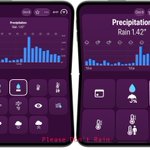
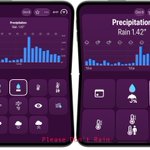
ALT Two iPhone Duos running Please Don't Rain in laptop mode. There are rows of buttons on the bottom screen that have various chart symbols. The top screen shows a precipitation chart. The right side version has very large accessibility fonts in use and the symbols are much larger. This results in less buttons on the screen.


ALT A cartoon frog under an umbrella. The text says "Major update. Foldable support. Please Don't Rain is now compatible with iPhone Duo, in every pose."

ALT Please Don't Rain running on iPhone Duos. Left has a sheet where the 'open in maps' button is halfway cut off. Right shows the button moved to the vertical toolbar and is instead a symbol of an arrow inside a box.


ALT Paul Hudson delivers the closing keynote called "The End of the Beginning" at Swiftsonic

ALT Please Don't Rain running on an iPhone Duo. Top is the image selection screen in landscape unfolded mode showing images for sunny. Bottom is in partially folded mode and the choices have adjusted to avoid the crease.

ALT Tyler Hillsman delivers a talk at Swiftsonic called "Decide What to Be and Go Be It"


ALT Chris Wu is a Swiftsonic speaker delivering a talk called "So you didn't make accessibility a priority"

ALT Two iPhone Duo screenshots showing Please Don't Rain. Top is fully unfolded and bottom is partially folded. In partially folded some elements that would have been in the center have moved to the left and the two sides of content have been evenly split.

ALT A screenshot comparing the old and new iPad versions of Please Don't Rain in landscape mode. In the new version elements are grouped together intelligently instead of being a straight vertical stack.

ALT A screenshot of Please Don't Rain showing details of a rainy forecast for Lake Buena Vista on the new extra large widget. It's able to show more details like hourly ranges with the extra space.

ALT Feedback I opened to Apple on June 29, 2023 that reads "I am begging you to add digital watch faces with the time in the center that allow complications." To the right is the new watch face with just that.