
Orbit Research develops and manufactures innovative and affordable products that enable an independent lifestyle for the physically challenged.
- Tweets169
- Following61
- Followers365
- Likes13






ALT Visitors interacting with a representative at the Orbit Research exhibition booth, showcasing assistive technology products for people with visual impairments.

ALT A group of visitors exploring the Orbit Research exhibition booth, featuring braille displays, graphic displays, calculators, and other accessibility products.

ALT Wide view of the Orbit Research and Encore Research exhibition booth, with visitors exploring assistive technology products alongside neighboring accessibility exhibitors.

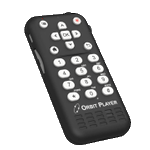
ALT Orbit Player handheld audio device with white tactile buttons, including navigation controls, a numeric keypad, a power button, and a speaker grille, shown at an angled perspective. The left side features an SD card slot and a USB-C port.

ALT Orbit Player handheld audio device with white tactile buttons, including navigation controls, a numeric keypad, a power button, and a speaker grille, shown at an angled perspective. The left side features an SD card slot and a USB-C port.

ALT Orbit Flow 40 refreshable Braille display shown from an angled isometric view, with a 40-cell Braille display, six round buttons at the ends, and five rectangular control buttons along the front edge.

ALT Orbit Flow 40 refreshable Braille display shown from the front, featuring a 40-cell Braille line, three round buttons on each end, and five rectangular control buttons along the front edge.

ALT Orbit Strata 40 refreshable braille display, a compact black device with a single row of braille cells and control buttons on each side, shown at an angle over a space background. Banner text: Try it out at the ACB Convention at the Orbit Research Booth 7

ALT Orbit Strata 20 Pro multimodal braille display, a compact black device with a row of braille cells, control keys and a round navigation pad, shown over a space background. Banner text: Try it out at the ACB Convention at the Orbit Research Booth 7

ALT Orbit Flow 40 refreshable braille display, a slim black 40-cell device shown over a blue and purple space background. Banner text: Try it out at the ACB Convention at the Orbit Research Booth 7

ALT Orbit Strata 40 Pro multimodal braille display, a long black device with a row of braille cells, side navigation keys and a round control pad, shown over a space background. Banner text: Try it out at the ACB Convention at the Orbit Research Booth 7

ALT Orbit Research ACB 2026 Special Offers graphic. Text reads ACB 2026 Special Offers, available through July 31, with the website orbitresearch.com/special-offers and phone number 888-606-7248, and the Orbit Research logo

ALT Booth visitors trying out the new Orbit Flow 40. A number of other Orbit braille products are laid out on the table, including the Graphiti Plus, which shows a map of Africa.

ALT A booth visitor exploring the content of a web page on their smartphone by displaying it on the Graphiti connected through an HDMI cable. The raised multi-level pins on the Graphiti show the shading and texture of the graphics on the web page. The Orbit Player is also shown next to the Graphiti.

ALT Photo showing an angled perspective view of the Orbit Flow 40 Braille Display. The picture shows device displayed on a dark blue space-themed background the braille cells on top of the unit, along with cursor routing buttons and six panning keys at each end of the display. On the left side is a USB C port for charging. Five thumb navigation keys are visible in the front

ALT Photo showing an angled perspective view of the Strata 20 Pro Braille Display. The picture shows device displayed on a dark blue space-themed background the 20 braille cells on top of the unit, along with cursor routing buttons and six panning keys at each end of the display. There are four function keys on both sides, eight dot keys, and four navigation keys with a select key. Dual speakers are positioned on each side of the device. On the left side, there is an audio jack. Five thumb navigation keys and two space keys are visible in the front.

ALT Photo showing an other angled perspective view of the Strata 40 Braille Display. The picture shows device displayed on a dark blue space-themed backgroundthe 40 braille cells on top of the unit, along with cursor routing buttons and six panning keys at each end of the display. There are four function keys on both sides, eight dot keys, and four navigation keys with a select key. Dual speakers are positioned on each side of the device. On the right side, there is a USB-C port for charging, one power ON/OFF key, and two volume keys. Five thumb navigation keys and two space keys are visible in the front

ALT Photo showing an angled perspective view of the Strata 40 Pro Braille Display. The picture shows device displayed on a dark blue space-themed background the 40 braille cells on top of the unit, along with cursor routing buttons and six panning keys at each end of the display. There are four function keys on both sides, eight dot keys, and four navigation keys with a select key. Dual speakers are positioned on each side of the device. On the left side, there is a USB-A port and an audio jack. Five thumb navigation keys and two space keys are visible in the front.

ALT Photo showing an angled perspective view of the Orbit Flow 40 Braille Display. The picture shows device displayed on a dark blue space-themed background the braille cells on top of the unit, along with cursor routing buttons and six panning keys at each end of the display. On the left side is a USB C port for charging. Five thumb navigation keys are visible in the front

ALT Photo showing an angled perspective view of the Strata 20 Pro Braille Display. The picture shows device displayed on a dark blue space-themed background the 20 braille cells on top of the unit, along with cursor routing buttons and six panning keys at each end of the display. There are four function keys on both sides, eight dot keys, and four navigation keys with a select key. Dual speakers are positioned on each side of the device. On the left side, there is an audio jack. Five thumb navigation keys and two space keys are visible in the front.

ALT Photo showing an other angled perspective view of the Strata 40 Braille Display. The picture shows device displayed on a dark blue space-themed backgroundthe 40 braille cells on top of the unit, along with cursor routing buttons and six panning keys at each end of the display. There are four function keys on both sides, eight dot keys, and four navigation keys with a select key. Dual speakers are positioned on each side of the device. On the right side, there is a USB-C port for charging, one power ON/OFF key, and two volume keys. Five thumb navigation keys and two space keys are visible in the front

ALT Photo showing an angled perspective view of the Strata 40 Pro Braille Display. The picture shows device displayed on a dark blue space-themed background the 40 braille cells on top of the unit, along with cursor routing buttons and six panning keys at each end of the display. There are four function keys on both sides, eight dot keys, and four navigation keys with a select key. Dual speakers are positioned on each side of the device. On the left side, there is a USB-A port and an audio jack. Five thumb navigation keys and two space keys are visible in the front.

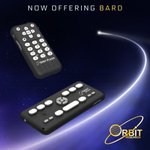
ALT Orbit Player and Orbit Speak devices displayed on a dark blue space-themed background with the text ‘Now Offering BARD’ and the Orbit Research logo. The image highlights accessible reading and audio solutions for blind and visually impaired users

ALT Orbit Speak handheld device with large tactile buttons and directional controls on a light background. The accessible audio and reading device from Orbit Research is designed for easy navigation and use by blind and visually impaired users

ALT Photo showing angled view of the Orbit Player and on the side view you can see power button and volume up and down button and on top keyboard with navigation keys.

ALT Orbit Q40 refreshable braille device with integrated keyboard shown beside a protective carrying case and an ‘Extended Warranty’ badge on a light background

ALT Orbit Q40 refreshable braille device with integrated keyboard shown beside a protective carrying case and an ‘Extended Warranty’ badge on a light background

ALT Orbit Speak handheld device with large tactile buttons and directional controls on a light background. The accessible audio and reading device from Orbit Research is designed for easy navigation and use by blind and visually impaired users

ALT Photo showing angled view of the Orbit Player and on the side view you can see power button and volume up and down button and on top keyboard with navigation keys.

ALT Congratulations to Sarah Moin on her extraordinary achievement of scoring 98.75% in the ISC Class 12 examinations

ALT Congratulations to Sarah Moin on her extraordinary achievement of scoring 98.75% in the ISC Class 12 examinations

ALT Congratulations to Sarah Moin on her extraordinary achievement of scoring 98.75% in the ISC Class 12 examinations

ALT New Strata and Flow families, Orbit Research is expanding how people read and interact with information.

ALT Strata 40 Pro - multimodal 40-cell braille system

ALT Strata 40 - 40-cell braille display with piezo braille cells

ALT Strata 20 Pro - compact multimodal braille system

ALT Orbit Research, the pioneer in affordable, high quality braille devices, is pleased to expand its partnership with Voice of Specially Abled People (VoSAP) to make reading and braille technology even more accessible to blind and deafblind individuals