

AA Wallet with social recovery mechanism. Simple, secure, low cost, and all-in-one. Steer projects and billions of users to Web3. https://xitter.gq/t.co/Zvd09AkZmE
Joined February 2023
- Tweets667
- Following45
- Followers23.1K
- Likes430








Pinned Tweet
Dear Valued Portkey Users,
In order to focus resources on enhanced services and improved user experiences.Portkey V1 will permanently close on October 16, 2025 (UTC 00:00)
✅ What You Need to Do:
Download Portkey V2 (iOS/Android)
Transfer all tokens to V2 before Oct 16
Export transaction history if needed
💰 Your Funds Are Safe:
All tokens can be withdrawn before closure
Locked ELF from BP voting will be fully compensated
Portkey V2 continues normal operations
📅 Key Dates:
Now - Oct 16: Migration window open
Oct 16: Last day to access V1
After Oct 16: Only V2 available
October 18: Locked ELF compensation process begins
blog.portkey.finance/posts/p…
One ecosystem, several paths:
CA wallet: user app → virtual account → delegation
DApp integration: dApp → Wallet Provider → Portkey DID wallet
Agent tooling: CA toolkit | EOA toolkit
Different jobs. Different trust boundaries. Keep the paths clear.

EOA automation uses a different control model: an encrypted local wallet and a resolved signer.
Portkey EOA Agent Skills exposes wallet lifecycle, queries, same-chain transfers, fee estimates, and contract calls via MCP, CLI, and SDK.
Separate model. Separate tooling.

An agent receives a request to transfer from a Portkey CA account.
The first step is not Send. It is preflight: balance, fee token, approval path, manager sync.
Portkey CA Agent Skills exposes that flow through SDK, CLI, MCP, OpenClaw, and IronClaw.

Why can account creation be free while a token transfer still has a network fee?
Portkey’s payment delegation follows the operation, not a blanket rule.
Creation and login are covered. Normal transfers are not. Some account-management actions are balance-dependent.

What happens when a dApp wants to support Portkey?
It can use Portkey Wallet Provider to connect directly to a Portkey DID wallet.
The provider handles the connection path. The dApp still has to explain why it needs the wallet and what the user can do next.

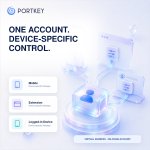
Your Portkey onchain account can remain the same across login devices.
The account is a virtual address. Each logged-in device gets its own manager address behind the interface.
One account onchain. Device-specific control.

Most people meet Portkey as a wallet app.
Beyond that screen is a broader ecosystem: an AA account model, a wallet provider for dApps, and separate CA and EOA tools for software agents.
Over the next seven posts, we’ll map the paths—and keep their boundaries clear.

This week, we explored:
— transaction status
— activity history
— Portkey and eBridge roles
— AA transfer limits
— explorer records
A useful wallet should not leave users guessing.
What should Portkey explain more clearly next?

A wallet shows the summary. A block explorer shows the public record.
To verify an action, start with its transaction ID:
— status
— block time
— sender and receiver
— transaction result
Use the record to verify what happened—not a screenshot alone.

History tells you what happened.
Transfer limits help define when extra approval is needed.
In a Portkey AA account, limits are set for a selected token on a selected chain.
Transfers above the daily or per-transaction threshold require guardian approval.

Cross-chain transfers are currently unavailable in Portkey.
Use the official eBridge app:
app.ebridge.exchange/
Before you bridge, verify:
— the full domain
— From and To chains
— wallet or receiving address
— token and amount
— transaction details

Wallet activity is not only about token transfers.
NFT transfers and social recovery actions can also appear in Portkey’s onchain transaction history.
Different actions. One place to review what changed.
Which record have you checked most recently?

A wallet should do more than help you send.
It should help you understand what happened next.
This week, we’re starting with one simple habit:
After you tap Send, check the record before you retry.
Is it pending, confirmed, or failed?

Before connecting Portkey to an app, take 10 seconds:
1. Check the URL
2. Confirm the app
3. Read what you’re approving
4. Cancel if anything looks wrong
A simple pause is part of a safer first action.

Your first Portkey action does not have to be a transfer or a trade.
It can be:
• opening your account
• finding your address
• reviewing recovery settings
• connecting to an app you trust
• reporting a confusing step
Learning the flow is a real first action.

Your wallet address is public.
Your recovery information is private.
Knowing the difference is one of the first Web3 basics.
In Portkey, start by finding your aelf address, copying it carefully, and checking the first and last characters before you use it.

Last week, we focused on clear answers.
This week, we’re moving from questions to action.
Open Portkey.
Check your account.
Find your aelf address.
Take one simple next step.
No need to do everything at once.
Start with one action.

Portkey FAQ Week recap:
This week, we focused on:
• wallet access
• account safety
• guardian / recovery
• common onboarding questions
• clearer first steps into aelf
Next, we’ll turn these questions into simple guides and first-action tasks.
Thanks for helping us make Portkey clearer.


What confused you most when using a Web3 wallet for the first time?
Was it:
• account creation
• recovery
• security
• gas / fees
• connecting to apps
• understanding addresses
Reply with one thing.
We’ll use the answers to improve Portkey FAQ content.


Guardian and recovery are important parts of the Portkey experience.
They are designed to help users keep account access safer and more recoverable.
This matters because Web3 should not feel like one mistake means losing everything.
This week, we’re collecting guardian / recovery questions for a clearer FAQ.

