

Experiences that help people choose with confidence and businesses improve. Community guidelines → https://xitter.gq/t.co/iULEEXVYHP
- Tweets3.5K
- Following1
- Followers3.7K
- Likes91








ALT Graphic with text announcing that Trustpilot has reached 300 million consumer reviews globally, set against a green background with white stars.

ALT Infographic on a dark green background featuring Trustpilot's star distribution chart and text that has the title 'Media Storms'. Under this, text reads 'In July 2022, we launched real-time detection of media storms. Our system now notifies our team within minutes of a sudden influx of reviews on a profile page, meaning that we can get ahead of media storms and protect the businesses that use our platform.'

ALT Graphic with text explaining that 'Money & Insurance' is a top category in detecting and removing fake reviews, highlighting significant activity around crypto-related services.

ALT Green background with text stating, "How many? We enhanced the detection of high-risk investment sectors, such as the crypto industry in 2023, resulting in 33,327 active 'High Risk Investments' alerts that inform and educate our community."

ALT Graphic with text advising caution when trusting someone with your money, especially regarding high-risk investments like cryptocurrencies.

ALT Green infographic titled 'The facts' highlighting that with the rise in popularity of cryptocurrencies, the crypto marketplace has become a target for scams that lure people with 'guaranteed' high returns and pressure them into acting quickly.

ALT Black text placed on a green background. The title reads 'Trustpilot's Google Chrome Extension'. Under this, the description reads 'Instantly view a business's TrustScore without ever having to leave the page.' Above this is an example of a business's website with the Chrome Extension showing the business's TrustScore of 3.7.

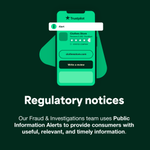
ALT A graphic depicting a smartphone interface with the Trustpilot app open showing a five-star review for "Clothestore.com," indicated as a verified company. Above is an alert notification with an "i" inside a green circle icon. Below, a heading reads "Regulatory notices" with text explaining that their Fraud & Investigations team uses public, useful, relevant, and timely information for consumer alerts.

ALT The image features two sections. The top section displays a mobile device with an open review app for "ClothesStore," showing a green interface with options to search, visit the shop, or write a review. The bottom section has text on a dark background. The heading reads "What are Consumer Warnings and Alerts?" followed by a paragraph explaining the platform's serious approach to misuses and alerts, including policy on how long they stay online. Below, a question "How long do Consumer Warnings stay in place?" is answered with information on removal conditions related to stopping misconduct or regulatory body notification.

ALT Two informational graphics explaining consumer warnings and alerts on Trustpilot. Top graphic is discussing misuse detection on reviews, featuring a speech bubble with "Warning! We've detected misuse on this page" text. Bottom graphic focuses on consumer alerts for high-risk businesses, with text "What you should know about high-risk investments."

ALT Graphic depicting the disputes decision process with a smartphone illustration displaying stats: 108 total reports, 36 reports under review, 17 invalid reports, 20 valid reports, and 18 reports closed. The background is dark with white text reading "Our decision disputes process. This provides a clear route for reviewers and businesses where they feel we've missed something in our initial decision".

ALT Infographic by Trustpilot highlighting their review flagging statistics for 2022-2023. The top half shows numerical data such as total reviews flagged, reports under investigation, and reports closed. The bottom half explains who can flag reviews and the criteria for flagging, including false information and promotional content breaches.

ALT Two bar charts comparing the number of consumer-flagged reviews in 2022 and 2023 by star rating and business-flagged reviews.

ALT Three interlocking circles labeled Technology, Community, and People, with a Trustpilot logo in the center. Text at the bottom reads "Protecting the platform - we make use of a range of safeguarding techniques to protect the Trustpilot platform – Technology, Community, and People."

ALT Image of a smartphone displaying a user review interface with various feedback options such as "offensive language" and "contains personal information," alongside a highlighted prompt asking if the content meets community guidelines under the heading "Did you know?".


ALT Black text placed on a green background. The title reads 'Trustpilot's Google Chrome Extension'. Under this, the description reads 'Instantly view a business's TrustScore without ever having to leave the page.' Above this is an example of a business's website with the Chrome Extension showing the business's TrustScore of 3.7.

ALT Promotional graphic explaining the operations of Trustpilot, featuring a diagram and screenshots that highlight the process of managing and sharing reviews in the community, allowing businesses and consumers to interact transparently and benefit from free access to reviews while offering additional paid services.

ALT A graphic containing four colored sections, each representing a different aspect of consumer-business interaction and review processes on Trustpilot, highlighting themes such as neutrality, openness, fairness, and transparency, along with a table comparing functionalities available to free and paying businesses and consumers.

ALT This image features an educational graphic with two sections, explaining how reviews are displayed on Trustpilot. The top section shows a stylized smartphone interface with search functionality, where the heading states "How we display reviews" followed by the subtext "Learn how reviews are displayed on Trustpilot." The lower section, headed "Trustpilot Reviews are sorted in two ways: most relevant (our default) and most recent," includes a depiction of a dropdown menu, indicating that the sort order can be changed by selecting an option. The image uses a theme of green and white colors and includes icons representing computers and search functionalities.

ALT The image displays a text-based interface explaining review sorting options, highlighting "Most relevant" as the default setting with a visual aid of radio buttons for other sorting options like "Most recent," to clarify user choices in review prioritization.

ALT Illustration of a smartphone displaying customer reviews with star ratings, showcasing a question "How is a TrustScore calculated?" in bold text.

ALT White text with the phrase "Time span" at the top left. It contains green text that reads: "The most recent review holds the most weight, since newer reviews give more insight into current customer satisfaction.

ALT Brown infographic card reading: "Frequency. Businesses should continuously collect reviews to maintain their TrustScore. A TrustScore will be more stable if reviews are coming in regularly."

ALT Dark red background with the text "Bayesian average. We automatically include the value of 7 reviews worth 3.5 stars each in all TrustScore calculations. As a business collects more reviews, this becomes a smaller factor in the calculation." in white and pink font.

ALT Graphic illustrating "The journey of a review through Trustpilot" in five steps, colored in green, yellow, orange and pink, with directional arrows. Step 1: "Creating and verifying your user account." Step 2: "A consumer writes a review about a genuine purchase experience." Step 3: "Reviews are run through our detection systems, all reviews may take up to 2 hours to be displayed." Step 4: "We continually safeguard the platform doing everything within our power to prevent and address misuse."