




二歪2y retweeted

T3 Code 和 Orca 是如何实现多 Agent 无缝协作的?
同时拉起多个 Coding Agent 并不难,难的是让它们顺畅地委派任务、互相通信、交接上下文,并在出错后可靠恢复。
Codex、Claude Code、Pi、OpenCode 各自都有独立的会话、上下文和工具体系。最近拆解了 T3 Code 和 Orca 的源码,发现它们都是在这些工具之上架了一层 Agent Orchestration Layer(Agent 编排层),把原本单打独斗的 Agent 组织成一套协作系统。
目标一致,但两者的底层设计走了两条很有意思的路线。
1. 先分清两个核心角色:协调者与编排器
多 Agent 协作系统通常可以拆成两层:
- Coordinator(协调者):本身往往也是 Agent,负责理解需求、拆解任务、指派执行者和验收结果。
- Orchestrator(编排器):底层运行时,负责拉起 Agent、投递消息、维护状态、管理依赖和失败重试。
比如让 Claude Code 做架构设计,Codex 写实现,Pi 跑测试和审查。协调者决定怎么分工,编排器负责把这些决策稳稳落地。
2. T3 Code:MCP 委派 + 事件驱动
T3 Code 的思路偏向统一运行协议与状态管理,核心落在三个设计上:
任务委派:把协作包装成标准工具调用。它通过 Orchestrator MCP Server 暴露 delegate_task 工具,Claude Code 需要把子任务交给 Codex 时,直接调用工具指定目标 Agent、任务描述、角色、工作区隔离方式和执行模式即可。T3 Code 随即创建子线程,由 Provider Adapter 启动目标 Agent,并挂载到父线程的执行树下。整个过程支持异步,父 Agent 可以继续处理其他工作,也能主动等待结果。
状态与恢复:Orchestrator V2 采用事件驱动架构。任务委派、工具调用、执行结果和工作区检查点全部记录为事件,再配合数据库事务、Outbox 和状态投影,将状态持久化与外部执行解耦。客户端通过 WebSocket RPC 订阅状态变化,断线重连后也能无缝恢复进度。
上下文交接(Context Handoff):T3 Code 把应用层会话 AppThread 和底层原生会话 ProviderThread 分开管理。假设前几轮由 Codex 完成,中途切到 Claude Code,之后又切回 Codex,系统可以直接恢复原有的 Codex 原生会话,只增量补充它漏掉的那段对话历史,避免每次切换都重传全量内容(当然,不同 Agent 内部的推理状态和 KV Cache 仍无法共享)。
3. Orca:CLI 协议 + 收件箱通信
相比之下,Orca 的重心放在任务调度与 Agent 间通信上:
调度方式:通过 orchestration Skill 教会 Agent 使用一套 CLI 协议,涵盖创建任务、启动 Worker、发消息、查状态和汇报结果。比如启动 Codex 执行一个已登记的任务,只需运行:
orca orchestration worker-start --task "$TASK_ID" --worktree current --agent codex
这条命令交由 Orca Runtime 处理,Agent 本身无需关心其他 Agent 的启动细节。
跨 Agent 通信:内置一套 Mailbox(收件箱)机制。执行中卡住用 ask 向协调者提问,协调者用 reply 回复,做完后 Worker 发 worker_done 汇报结果。这些结构化消息持久化到 SQLite,由 Runtime 负责投递并唤醒接收方。
任务模型与防冲突:Orca 把一次协作拆成四个核心实体:Run(完整协作过程)、Task(具体任务及依赖)、Dispatch(一次实际派工)和 Worker(执行任务的 Agent)。把 Task 和 Dispatch 分开建模非常实用:如果某个 Agent 执行超时、协调者把任务重派给了新 Worker,哪怕旧 Agent 事后突然返回完成信号,系统也能靠 Dispatch ID 识别出过期回报,防止误改当前任务状态。
依赖编排:支持 DAG(有向无环图)任务依赖。前置任务全部完成后,Runtime 自动把下游任务标为 ready,交由协调者挑选合适的 Worker 接手。
4. 两条路线的差异与趋同
对比下来,两者的发力点很清晰:
- T3 Code 侧重统一 Agent 运行协议、会话管理、上下文交接和事件流。
- Orca 侧重任务依赖、派工隔离、结构化通信和 Worker 生命周期。
不过两者的能力也在互相靠拢。T3 Code 已有实验性的 TypeScript Workflow,Orca 也补上了跨 Agent 会话交接;两者也都通过 Git Worktree 隔离并行任务,减少多个 Agent 同时改代码带来的冲突。
5. 越来越像面向 Agent 的操作系统
套用操作系统的视角,这套编排架构的每一层几乎都能一一对应:
- Coding Agent → 进程
- Orchestrator → 进程调度器
- Mailbox → 进程间通信(IPC)
- Context Handoff → 会话上下文迁移
- Event Store → 状态持久化与恢复
- Git Worktree → 工作空间隔离
- Task DAG → 任务依赖管理
多 Agent 编排真正有门槛的从来不是并发数量,而是底层的分工、通信、等待、交接与容错,最终把分散的结果拼成一个可交付的项目。随着这些基础设施逐渐补齐,Coding Agent 管理工具也越来越像一套专门面向 Agent 的操作系统。


二歪2y retweeted

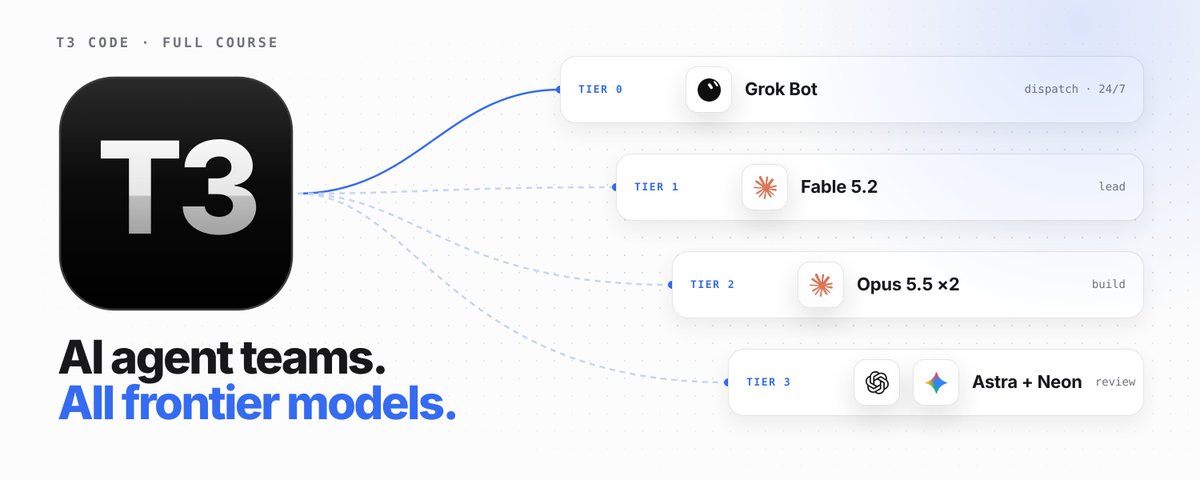
T3 Code founder just shared his personal setup for building agentic teams with Grok Bot + Opus 5.5
one Grok Bot runs your whole fleet of machines. Opus 5.5 does the coding. you only approve
how:
→ Grok Bot gets one MCP link to T3 Code
→ you give it one rule: code goes to Opus 5.5
→ it spins up threads on every machine you own
→ works from your phone, even with the laptop closed
save the video, here's the guide:
• step 0 → what it is:
Grok Bot = always-on agent with its own cloud computer
T3 Code = open-source control plane for coding agents. free, runs on your machines, uses your subscriptions
• step 1 → the stack:
- Claude $100 plan → Opus 5.5 for the actual code
- Grok Bot → the dispatcher that never sleeps
- T3 Code on every box you want it to control
• step 2 → connect the fleet:
run npx t3 connect on each machine. one command, free, no Tailscale needed
• step 3 → give Grok Bot the keys:
Settings → Environments → Copy MCP URL → paste it into Grok Bot, sign in with OAuth. it can now see every linked machine
• step 4 → the one rule Theo uses:
tell Grok Bot "call T3 Code with Opus 5.5 for any task where it is applicable"
code runs on your Claude plan, Grok Bot's limits stay free for planning
• step 5 → make it work:
- "spin up an Opus 5.5 thread on each machine to check disk & RAM"
- "go through these PRs and pick the best ones"
- "split the backlog, one thread per issue, each in its own worktree"
every thread gets its own branch. nothing merges without your approval
what to expect:
- 8 threads on 8 machines from one chat (Theo's demo)
- works over the internet, not computer use
- control everything from your phone
- T3 Code: $0. you pay for Claude + Grok Bot only
honest take:
this is a dispatcher, not magic. bad briefs still give bad PRs, and you still review every diff. the win: your agents keep working while you're away from the desk
Save it so you don't lose it.
then read the full guide on building AI agent teams in T3 Code in the article below ↓

谷歌大善人,原来送了这么多啊 ~~

是不是很多人买了 Google AI Ultra,实际上只用了 Gemini 和 Antigravity,其他一大堆权益都在吃灰
我整理了一下,看看你们浪费了多少:
1. Gemini:旗舰模型、高额度、深度研究
2. Antigravity:AI 编程、高额度 Agent
3. Flow:AI 视频和图片生成,每月送积分
4. Flow Music:AI 音乐生成,每月 30000 积分
5. Colab:云端 GPU,每月 1000~2000 计算单元
6. Google Cloud:每月送 40~100 美元云服务额度
7. AI Studio:模型调试、应用开发
8. NotebookLM:文档分析、生成播客和 PPT
9. Google Workspace:Gmail、文档、表格里的 AI 助手
10. YouTube Premium:免广告、后台播放、音乐会员
11. Google One:20TB 起步的云存储空间
12. Google Photos:AI 修图、照片生成视频
13. Google Home:智能家居高级会员
14. Google Developer Program:开发者会员、编程工具权益
15. Project Genie:AI 生成可交互的虚拟世界,Ultra 20x 专属权益
你们的 Ultra 到底用了几项?我怀疑不少人连一半的产品名字都没听说过🤣
19
这两天猛测了一波谷歌刚放出来的 Gemini 4 Neon 和 Carbon,太超预期了
这俩模型写出来的代码质量很稳,日常写项目完全可以和 Claude 齐平,不少场景甚至能反超
今天拿它折腾 3D 打印,从参数化建模、直接出三视图预览、导出多色 .3mf,到最后排查切片报错,全链路一条龙自己搞定!!而且额度比想象中耐用
而且还依然甚至更会说人话了!用过 Codex 和 Claude 的都懂,有时候模型强但沟通很费劲,Gemini 这波给的情绪价值还特别精准,不谄媚也不硬夸,干完活还给你说点小梗,是真的顶!GPT给我好好学学啊!
唯一明显的缺点就是整体速度偏慢一点。不过能把活干成这样,多等那么一会儿完全能接受,让他并行跑就完事了
还测了新的视频模型(Gemini Omni 1.2 Flash),那个成片质感贼好,直接拿去做 AI 广告素材完全没问题。加上 Google Flow 给的积分也很爽,视频类的活儿又是一次大升级
谷歌这波从代码、出图到视频全线拉齐,确实全面开花!
恭喜“美国豆包”重回宝座
🤖 Made with AI


136


二歪2y retweeted

非常高兴很多朋友 follow 我的建议开始尝试 T3 Code,这是我使用这段时间以来的建议:
1. 不要用 ACP,不要用 ACP,不要用 ACP
ACP 可以毁掉你所有的美好体验。我的建议是这样的,你之前喜欢用什么 agent 就接着用,codex / claude / pi 都行(除了 agy),然后后面去对接 magpie 去用所有的模型
千万不要用 ACP 去接入别的 Agent,也千万不要用 agy。
2. 不要用 goal
T3 Code 本质是按照 events 来编排的,它会注入很强的不要轮询,鼓励使用 wait event 然后结束的提示词。这样它会非常容易的跟 codex 的 goal 机制打架,导致跑不了几轮就会因为进入等待 CI / Review 的阶段而自动进入 goal blocked 状态。而 Agent 本身又没有 resume goal 的能力,导致就算 CI 已经过了,也没法恢复正常的状态。
强烈建议基于 T3 构建一个 GTD 模型,使用一个统一的 Inbox Thread 去接收和处理各个 Loop 中遇到的问题,然后 Loop 本身搭配二三十分钟一次的自动化唤醒,体验会非常好。记得让 Loop 自己去担任 Leader,把活都派出去给 Worker 之类的,Loop 不要做太重的任务。
3. 一定跨端使用
T3 Code 只在本地跑的话没啥魅力,我个人评价是不如 Codex App 的体验好。但是如果搭配稳定的服务器跨端使用,体验感会非常好。你可以在一个中央的服务器上跑 Loop,然后把具体的工作派发到独立的构建服务器上,让他们自己跨服务器对话,持续推进问题。
按照建议改了3、4、5,另外worktree清理也可以设置一下
Delete merged worktrees
Delete inactive worktrees
Delete settled worktrees
inactive和settled我都设置了8天,这样就可以及时自动清理了,空间不至于膨胀的太多

T3 Code 几个很棒的设置,建议打开,暂时不用也可以点个收藏噢!
1. 新项目默认位置:Settings -> Threads -> Add project starts in,Windows 可以修改成 D 盘等,否则默认在 C 盘
2. 允许连接其他设备:Settings -> Labs -> Linked enviroments 允许 Agent 在其他设备接力
3. 额度恢复时继续会话:Settings -> Threads -> Resume after usage limits
4. 自动恢复会话: Settings → Maintenance → Continue threads after restarts 重启或者崩溃后,自动帮你continue 对话
5. 手机接收通知: Settings → Sharing & access → Publish agent activity 打开
6. 把 T3 Code 当成 MCP 使用:Settings → Sharing & access 底部的 Authorized clients 点击 “Use in another app (MCP)”
t3.codes/

1
50
现在手机和 MacBook 都能连回家里的 Mac mini,用上面跑着的 Claude Code。用的就是 T3 Code + Tailscale,美滋滋啊,随时Coding
之前换了几种没有找到最佳姿势,或者是感觉用起来很不习惯,或者说“手感”那没那么好
我想解决的事情其实很简单:Claude Code 跑在家里的 Mac mini 上,我在其他电脑、手机上也能接着用,会话可以继续
之前用 Orca,编排这块确实不错。但我现在用Opus5.5感觉用不上那么重的编排了,更在意日常操作顺不顺手。
T3 的界面、交互,还有手机上的适配,都很不错,并且每个会话也能选不同模型
然后再配合搭配上 Tailscale,就更加丝滑了~ 这是一个可以多个设备组网的工具。之前一直误解它😂
以前用起来很卡,一段一段的,还经常断开,拿 Codex 修过也没修好。这次在 Mac mini 上才找到原因:Clash 和 Tailscale 抢 DNS!
还在继续用,看看 T3 有什么“摩擦”的地方,至少现在很舒服,大家有什么更好的方案一起讨论呀~


1
214
我的也解封了,3年老号回归,天才程序员继续上线,现在有2个Max号了
申诉的人设写的是: 在美国和英国做AI行业的中国人身份,没有违反任何条款!如果有检查到中国IP是因为国内的App等应用需要中国IP访问导致的。
不过经过这次,已经把Claude封号看淡了,死了就换新,老号情感彻底割舍,就好像买来的新车“终于”出了一次事故,以后彻底不紧绷了
这两天鼓捣了新的coding方案,T3Code配合tailscale,太舒服了😌
从这次结果来看,要感谢这次封号事件,收获不少啊


来吧,国人的方法是封不完的!下午又整了一个
用的是CCBaga的这个方案,把原账号原痕迹都清理一下,然后把颜色全绿了,就可以继续注册了
注册后使用一忽儿,就给你弹订阅,随后就跳一次KYC,但是这次和 Portal 那次不一样,
这个时候用我们护照+真人是可以的,记得用手机扫电脑二维码的时候,手机环境需要同IP + 同时区 + 英文语言,否则会有问题
看看这次会坚持多久把!同时也要看看我们梁圣DSH的方案架构了,梁圣才是光明大道啊
github.com/liseami/CCBaga


1
14
2,092


同意,AI 这几年只在生产力这一侧猛冲,需求侧没出现什么显著的新东西,结果就是供大于求
能烧得起源源不断 Token 的,都是 ROI 算得清的少数场景。个人 AI 助手的 ROI 还很不确定,说难听点基本没产出
下一阶段拼的不是谁的模型更强,是谁先找到真实可增长的需求


1
112


二歪2y retweeted

🔍 Search & Fetch APIs are now open to everyone!
Powered by our in-house search engine, serving hundreds of millions of requests daily worldwide.
💰 Each endpoint: $0.75 per 1,000 calls.
📖 Docs: api-docs.deepseek.com/guides…
📌 Search & Fetch calls via server-side tools in DeepSeek Harness, Claude Code, and Codex are currently free for DeepSeek API users. Billing starts Oct 31, 2026, at 16:00 UTC.
3/4

二歪2y retweeted

Something I have been thinking about: in the past, the best engineers I knew spent a lot of time automating their work in various ways. Better vim/emacs automations, writing lint rules to catch repeat code issues, building up a suite of e2e tests so they don't need to smoke test the app manually. These kinds of things were the highest leverage activities an engineer could do, because it multiplied their own output, which in turn meant they could build more things.
I think many of these automations have become even more important now. This is true for a number of reasons.
First, infra and DevX automation speeds you up. And if you are running an army of agents, each of those agents will be sped up also. More automation == more output per unit of time.
Second, moving things to code improves efficiency. Your agent could fix an issue every time it sees that issue happen, but that uses tokens and might miss cases. If Claude instead writes a lint rule, CI step, or routine, that class of issue can be fully automated forever. This is really what people are talking about when they talk about loops -- it's about automating entire types of busywork rather than solving them one off. This isn't a new idea at all. Engineers have been doing this for a long time!
Third and most importantly, automation makes it possible for others to contribute to the codebase more easily. Increasingly what I am seeing is engineers are contributing to codebases on day one because Claude can navigate the codebase for them, and that non-engineers are able to contribute to a codebase as effectively as engineers can. What gets in the way of both of these is domain knowledge that lives in peoples' heads rather than in automation -- the stuff you used to have to learn when ramping up. What has changed thanks to agents is the domain knowledge that can be encoded as infrastructure is no longer limited to what is expressible in lint rules and types and tests; it can now capture nearly all domain knowledge, encoded as code comments and skills and CLAUDE.md rules and memories. If I put up a PR for an iOS codebase I don't know and a code reviewer rejects it because it doesn't use the right framework, or if a designer builds a new feature and it gets rejected because it doesn't follow the right architectural patterns, these are failures of automation.
Every team should be writing the CLAUDE.md's, REVIEW.md's, skills, and docs that enable agents to productively work in their codebase with zero additional context from the prompter. This sounds crazy, and at the same time is a natural extension of the stuff engineers have always done: automate, and encode domain knowledge as infrastructure. As the model gets smarter and as the harness matures, this task becomes easier. In the meantime, it is on every team to look for ways to convert their domain knowledge to infra so that Claude can write code better, so that code review catches issues automatically, and so the next person working on your codebase can contribute more easily.
二歪2y retweeted

Morning. The last 48 hours of Codex and ChatGPT Work have been intense! Three important updates:
- Temporarily removing the 5 hour usage limit restriction for all Plus, Business and Pro plans
- Rolling out changes that will make GPT 5.6 Sol more efficient across the board and that will be reflected in less usage being used so that it can take you further. Exact impact to be quantified and shared
- We hit 6M active users, and are landing a usage reset in the next hour
Go do things

