iOS Engineer @ November Five • Creator of @FilmBuffApp, @SiderTodosApp, @TapMasterApp, @PortraCamApp, and @RandoMenuApp
Antwerp, Belgium
Joined August 2021
- Tweets305
- Following583
- Followers866
- Likes1.8K
Pinned Tweet
Hey iOS Devs! I just released my first app! 🎉
Film Buff - Journal & Tracker
🚀 Add, Favorite, Search, Sort Films
🔮 Get random watchlist suggestions (+ widgets)
🍿 And more @FilmBuffApp
apps.apple.com/us/app/film-b…
RTs ❤️ appreciated!
Tech, design and more 👇
#iOSDev #indiedev
I'm extremely happy! @TapMasterApp got included on The 𝗯𝗲𝘀𝘁 Apple Watch Apps of 2022! ✨
Thank you @techradar and @carrieinglasgow! 🥳
techradar.com/best/best-appl…
Hello! This is my new app Portra Cam. I haven't promoted nor shared it anywhere, but it has already 45+ downloads in less than two days 🥳
Like what! HOW?! It was even downloaded from Palau (Pop. 18k, Oceania) 😅
Try @PortraCamApp! I'd love to hear your thoughts (link in bio)
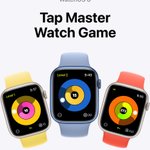
Hello! I’ve just launched one of the most addictive games to watchOS! 🤩
🏆 Do you have what it takes to be a Tap Master?
🎯 Tap at the right time, close rings & reach the target score!
🔥 Leveled and endless game modes!
Tap Master (@TapMasterApp) 🔁 ❤️
apps.apple.com/us/app/tap-ma…
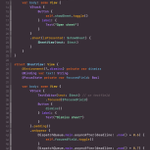
This modifier allows you to make your ZStack dynamic to its content! ⚡️
The .fixedSize() instance method hugs the view at its ideal size.
An extension to detect iPhones with a notch (undeprecated iOS 15) 🤩
This may help you utilize the status bar area without disrupting your design on other devices.
Hey iOS Devs! I just launched my first iPadOS app! 🥳 🎉
Sider - Todos for Tomorrow (@SiderTodosApp)
Reminder for notes & sketches 📝 🎨
apps.apple.com/us/app/sider-…
#iOSDev #indiedev #iOS #iPadOS #MacOS #SwiftUI
With @SiderTodosApp, I focused on the UX, details, delays, animations, custom views and designed the app within the iOS design nature.
Sider was built with Swift, SwiftUI, MVVM, Combine, CloudKit, Core Data, PencilKit, UserNotifications, Local Auth, StoreKit 2 and WidgetKit.
1
5
Oh, and while messing around with @figmadesign , I made these shape gradient wallpapers. Feel free to use any of them if you like them! #wallpaper #figma #design
6
I just finished watching @tundsdev ’s great Swift Concurrency video, as well as all of his other videos over the last six months. His explanations and the way he addresses the ideas are brilliant and to the point. If you've done 100DOSUI, you should definitely check out his YT!
🚨 Here’s my final video for the year, in this new tutorial we’ll be covering all the topics in Swift Concurrency with practical examples in UIKit & SwiftUI.
#swiftui #iosdev #swiftuitutorial #swiftlang #swiftuiswiftconcurrency #swiftconcurrency
🎥 youtu.be/U6lQustiTGE
Day 100 of #100DaysOfSwiftUI ✅
Learned so much during the journey and connected with lots of fellow developers! Thank you for your support #iOSDev Community! I'll be continuing by developing apps for my GitHub and portfolio! 🙌
Thank you so much @twostraws! You are the best!💎
I signed up for the #iOSDevHappyHour🍻 for the first time! I'm definitely looking forward to seeing everyone in the community! (I'm nervous 😅) #iOSDev
It's that time again! ✨#iOSDevHappyHour is BACK for October! 🍻
We'll have guest speakers, breakout rooms on your favorite topics, and opportunities to make new friends and connections!
Join 200+ iOS Devs 📱REGISTER TODAY and RETWEET 🔁‼️
iosdevhappyhour1016.eventbri…
4
Day 89...97 of #100DaysOfSwiftUI ✅
SwiftUI’s three step layout system, alignment & alignment guides👌 But at the end of day 94, I was really struggling with the GeometryReader challenges (I couldn't finish the last one). The last day is tomorrow!
8
Day 79...88 of #100DaysOfSwiftUI ✅
Learned about EnvironmentObjects, objectWillChange, fetching with Result, tab bars, context menus, Image interpolation, UserNotification, filter(), gestures, CoreHaptics and more. Completed the review and the challenges for Project 16 as well!
10
Day 78 of #100DaysOfSwiftUI ✅
The previous version now includes MapKit and CoreLocation!🗺
I created a new coordinate attribute (CoreData) that stores the longitude and latitude. Later, I simply used the NavigationLink to pass the coordinates and the description to the MapView.
Day 65...77 of #100DaysOfSwiftUI ✅
The milestone challenge has been completed (took me about a full day). The image was stored as binary data in CoreData and then presented as a UIImage. It was without a doubt the most difficult challenge to date.
7
Got these 3 in the mail today!! (Config: M1 Mac mini + 16 GB RAM) #MacMini #M1MacMini #AirPods2 #Apple #ExtremePortableSSD
3
Not only that, but there are 20 different frameworks to work with, 20 different technologies to use, and something brand new comes out every few months, so you can't rely on a technology for a long period. #WebDevelopment
Legitimately have so much respect for web devs. If you Google how to do something for iOS it’s like “there are 2 ways, probably just do the first”, I Google a web dev thing and it’s like “there’s 400 ways, using 300 libraries, and if this post is a year old it’s probably wrong”
Day 57...64 of #100DaysOfSwiftUI✅
Today I've learned about the Image processing frameworks, integration of UIImagePicker to SwiftUI, and learned how to save those images.
Question: I used Realm while working with UIKit, but where does it stand in SwiftUI? Do you guys use it?🤔
Day 53...56 of #100DaysOfSwiftUI ✅
Completed the review and challenges for the Bookworm project (project 11). Learned about building custom UI components while sharing the data, between views, with property wrappers.
Working with Core Data was really enjoyable!
4