

Exploring Cocoa Touch Internals
Joined February 2024
- Tweets1.9K
- Following99
- Followers1.2K
- Likes7.2K







New SwiftUI API in OS 27.3!
Control whether scrolling locks to one axis per gesture in views that scroll both ways.
Could be useful for spreadsheet apps? 🤔
developer.apple.com/document…

I’m not sure I like the idea of the user’s glass tint setting affecting the scroll edge effect, but switching to Soft Edge seems like a step in the right direction.


Starting in iOS 27.3, the Siri app introduces a new design pattern with a tab bar between two buttons when Recaps is enabled
The Compose button is not a prominent tab.
This layout can be achieved by embedding a UITabBar in a toolbar and applying a few SPIs!


I guess I/O → External Displays still hasn’t been implemented in Device Hub, right?
Why would they replace Simulator App with something that removes so much GUI functionality? 🙄
2
8
1,354
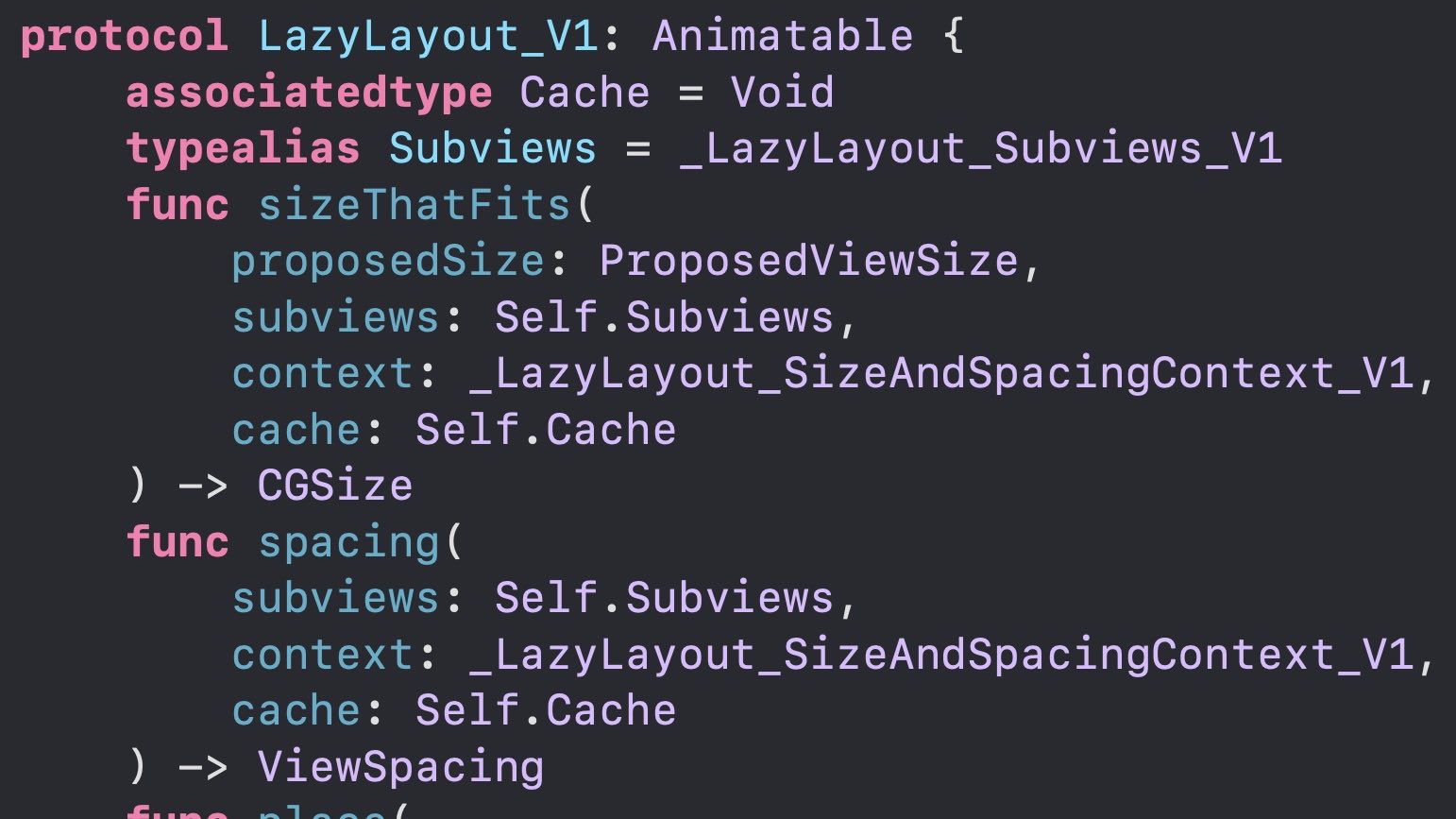
A new private SPI in SwiftUI!
TextSelectionGroupModifier merges selection across multiple Text views. `.textSelection` can exclude parts, while other SPIs customize selection order and copied text.

The LazyLayout protocol is one of the features developers have been asking for, and it’s already being used in production by system apps.
If it becomes public in the next major release, SwiftUI will definitely be moving in the right direction!
When Face ID stopped working for me, I couldn’t open the Passwords app or access my passes in Wallet.
Apparently, the private LAPolicy (LBDeviceOwnerAuthentication, 1025) allows fallback authentication in familiar locations when DTO is enabled.
5
770


Apple has updated the CarPlay docs. HomeView supports two app categories: audio apps and video apps 👀
developer.apple.com/download…


Looks like Widgets and CarPlay are the 3rd party developer story for HomeView: developer.apple.com/support/…

On iPhone Duo, the layout margin on the side adjacent to the Vertical Bar is 0pt, resulting in asymmetric left and right margins.
UIKit’s layoutMarginsGuide handles this automatically, but in SwiftUI, use .contentMargins(for: .container) on iOS 27.1+.
More in the replies...

ALT Side-by-side comparison of SwiftUI layouts on iPhone Duo. ✅ Left: Using .contentMargins(for: .container) automatically adjusts the layout margins, allowing content to extend to the edge adjacent to the Vertical Bar. ❌ Right: Using fixed horizontal padding of 16 or 20 points leaves an unnecessary gap next to the Vertical Bar. Red vertical lines highlight the difference in content alignment.
Also, SwiftUI views like List and Form, which use UIKit platform views under the hood, automatically handle these issues internally.
1
2
811
If you’re prepared to build a custom Vertical Bar for iPhone Duo instead of using the system toolbar, Mobile Safari is a great reference.
It handles its own layout and uses UIButtons, after all 😉

ビスター(Vistar) retweeted

some more iOS dev pro tips:
- if a method is deprecated, that means apple finished working on it. it's actually more stable.
- if the main thread becomes slow, create a second main thread.
- if a view isn't appearing, set its zPosition to infinity. that's what infinity is for.

It’s interesting how the physics of Liquid Glass differ between OS versions. There’s a pretty big difference when LensView moves from right to left🫧

ALT Top: OS 26. Bottom: OS 27. Both show a frame of the Tab Bar’s LensView moving from right to left. In OS 26, the LensView stretches vertically and compresses horizontally, while in OS 27, it stretches horizontally and compresses vertically.