

Can your GPU run that model? Find out in 10 seconds. Free VRAM calculator + no-hype hardware guides for local AI.
Joined June 2026
- Tweets443
- Following134
- Followers225
- Likes438







Old DDR3 Xeons are supposed to be e-waste for local AI.
75 tok/s. Qwen 3.8 Flash Next, a 180B model, answering after a 172K-token prompt.
The box: two Xeon E5-2670 v2 with no AVX2, 64 GB of DDR3, PCIe 2.0. And 2x CMP 50HX mining cards, memory-modded from 10 GB to 20 GB each.
On 1 October Strata refused any CPU without AVX2. On 4 October it ran them.
xrip measured this box on his own build of Strata 0.2.0: 65.5 tok/s by default, 75.1 with 19 CPU workers, six runs.
Why it works: 98% of the experts sit on the 2x mining cards. The old CPU computes the other 2%.
Which old Xeons run it, and the October fight that got Strata there: Issue 2 of The Local LLM Sizing Guide, out tomorrow.
vramcalculator.com/sizing-gu…

Apple's 512 GB Mac Studio is orderable now: $22,299.
The 256 GB version of the same M5 Ultra chip is $10,799. So what does the second 256 GB buy?
At 256K of context, by our calculator, mostly better copies of the same models:
MiniMax M3.1 Flash: Q2_K on 256 GB, Q8_0 on 512
GLM 5.3 Flash: Q3_K_M, then Q8_0
Ornith 1.5 397B: Q3_K_M, then Q6_K
Qwen 3.8 Flash Next: Q5_K_M, then Q8_0
And the 550B to 1T class moves in: DeepSeek V4.1 Flash 1017, GLM 5.3, Kimi K2.6 and Inkling 975B, whole, in memory, at 256K. 73 models fit against 58.
One thing to know before you pay: Strata's own Mac plan runs DeepSeek 1017 at 2 bits with every expert in memory on the 256 GB model too. It reads the lookup tables from the SSD.
Speed on this chip: DeepSeek 1017 at 54.5 tok/s (256 GB M5 Ultra, ds4, tested to 128K, @niklaslenz_ai). The weak side is prompts: 1,475 tok/s reading a 32K one.
We sized this Mac in September, before it shipped. The second image is a page of Issue 1: every model we size, on eight machines. Issue 2, out 31 October, has the full launch dossier, and Issue 1 comes with it.
Long chats and code, or long prompts all day: which is your workload?
vramcalculator.com/sizing-gu…


Project Maya calculator 0.7 alpha is out. This one is about the builds you actually download.
Check your machine before you commit 200+ GB. The abliterated DeepSeek Mix-128G and Mix-256G, plus the CYBER-FROST Flash Next, are in the picker and sized against your card, RAM and disk, with the per-GPU split the tool cannot see marked HOLD. So is every GLM, MiniMax and Qwen build.
The calculator engine got a real upgrade, and it is experimental. Support, pictures, drafters and the card limit now come from one set of rules, so the picker and the verdict cannot contradict each other. Cards allowed: 16, double the old 8. Fewer contradictions, which is the point of a sizing tool.
Accuracy Boost: the GLM baseline was re-run, 18,720 plans, none moved. 271 parity checks. 108 to 117 cards per family, re-read from Maya 1.1.34 on 28 October.
The UI additions are experimental too. Copy link puts your card, RAM, context and build in the URL: send it to a friend and they open the same machine and the same verdict. Copy summary writes the setup and the numbers as text, for a reply, an issue or your build notes. Rows and tabs work from the keyboard.
vramcalculator.com/project-m…

The MiniMax builds in that table are @PeasantSmith's, and Project Maya has been shipping model after model this month: MiniMax M3.1 Flash in three sizes, Qwen 3.8 Flash Next with the CYBER-FROST GGUF, DeepSeek V4.1 Flash 1017
github.com/mw00/project-maya

Nanbeige 4.3 33B fits a 24 GB card at Q4. That is the trap.
The Q4_K_M file is 20.79 GB. With the default cache, an RTX 3090 or 4090 gives you 16K of context. The model advertises 512K.
It is dense, with full attention on all 52 layers, so every token of context costs about 0.2 MB of VRAM. 256K of cache alone is 56 GB, more than two 3090s hold.
What actually works on one card, with the desktop running:
RTX 3090 / 4090, Q4_K_M, 4-bit cache: 32K
RTX 3090 / 4090, Q3_K_M, 8-bit cache: 64K
RTX 5090, Q4_K_M, 4-bit cache: 128K
16 GB cards: Q2_K only, 32K with a 4-bit cache
A 4-bit cache costs some quality. A smaller file costs more. Pick which one your work can lose.
So who is the 512K window for, exactly?
Your card, your context: vramcalculator.com

VRAMCalculator retweeted

Project Maya v1.1.29 is here, and it's a big one: MiniMax-M3.1-Flash now runs on Maya.
That makes three frontier open models you can run at home on your own GPUs: GLM-5.3-Flash, DeepSeek-V4.1-Flash and now MiniMax-M3.1-Flash, a 428B model with 23B active per token and up to a 1M context.
MiniMax gets its own engine, built by @needmorevram. We brought it up to the same standard as GLM and DeepSeek before shipping it:
- Runs on NVIDIA from V100 up, on Linux and Windows
- Fits itself to your PC: the setup picks the context your memory can hold, and the engine plans VRAM and RAM instead of failing
- A compact cache by default, so long contexts take half the memory with no loss in quality
- Pictures, tool calls and every one of MiniMax's thinking levels, with its own recommended settings out of the box
- The vision tower stays off your GPU until you send a picture, so the VRAM goes to the model
Huge thanks to @needmorevram, and to everyone who tests, reports and contributes to Maya. This is what community open source looks like.
Next up (WiP): our own Maya GGUF quants of MiniMax-M3.1-Flash, small enough for a 128 GB PC.
Link in the reply 👇

64 GB of VRAM is supposed to cost workstation money.
$1,300 to $1,700. Used. NVIDIA's CMP 170HX, a 2021 mining card.
Same GA100 chip as the A100, HBM2e at about 1.5 TB/s, faster than an RTX 4090. NVIDIA shipped it with 8 GB usable and left the other 56 GB locked on the board. A software unlock, cmpunlocker, opens all of it.
What one unlocked card holds, by our calculator, every layer on the card:
Qwen 3.8 Flash Next 180B, Q3_K_M, 64K context
Ornith 1.5 122B, Q3_K_M, 262K
Qwen 3.8 27B, Q8_0, 512K
Nanbeige 4.3 33B, Q8_0, 128K
LTT Labs measured Qwen 3.8 27B Q8_0 at 33 tok/s on one unlocked card. Two RTX 3090 Ti: 31.
A used A100 40 GB still sells for about $3,500.
The catch is a lottery. The 8 GB card opens to 64 GB. The 10 GB card stops at a stable 40. How to tell them apart before you pay, and which unlock to run on which, is the variant unlock sheet in Issue 2 of The Local LLM Sizing Guide, out 31 October.
So which one is in that listing?
vramcalculator.com/sizing-gu…


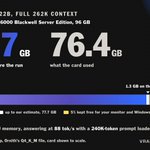
Before we loaded Ornith 1.5 122B, our calculator said it would use 77.7 GB at its full 262K context.
On an NVIDIA RTX PRO 6000 Blackwell Server Edition it used 76.4 GB. 1.3 GB on the safe side.
The card ran in a server with no screen. On your desktop the calculator also keeps 5% of the card free for your monitor and Windows, so a "fits" answer holds there too.
The run: whole model on the card, Ornith's own Q4_K_M, llama.cpp.
Answers at 88 tok/s with a 240K-token prompt loaded, 108 tok/s at 128K.
Every run we make, misses included: vramcalculator.com/vram-calc…

The Strata calculator 0.8 beta is live, and it now sizes DeepSeek V4.1 Flash 1017.
Strata 0.2.4 runs this 763B model on one 12 GB graphics card. The busiest experts sit in your RAM, the rest stream from your SSD.
Pick your card and RAM to see which of the three sets runs, how much disk it needs, and how much of it ends up on the SSD.
What to expect, by Strata's own figures: about 8 to 10 tok/s on an RTX 3060 12 GB with 46 GB of RAM. RAM matters most: @Tono_Ken3 got 38 tok/s with 256 GB.
vramcalculator.com/strata-ca…

ALT Strata calculator 0.8 beta card: a tilted screenshot of the calculator showing DeepSeek V4.1 Flash 1017 on an RTX 5070 12 GB with 64 GB of RAM, beside the new features: three ISTA-DASLab sets, Strata's own placement, 12 GB card, 46 to 64 GB of RAM, 239 to 274 GB of disk, real runs, Project Maya one click away.
New cards since the last update:
• Tesla P100 12GB. Pascal is experimental in Strata: its CUDA 12 package ran an IQ2_XS model on a P100. @VectorCrossProd
• NVIDIA's CMP mining cards: CMP 30HX 6GB, 40HX 8GB, 50HX 10GB, 90HX 10GB and 170HX 8GB.
• The CMP 170HX with its memory unlocked by cmpunlocker: 64 GB from the 8 GB card, 40 GB from the 10 GB card. Experimental, Linux only, and models load slowly over its PCIe link.
The engine and the files: Strata 0.2.4 by @coldniko (Terminal only for now, the app follows) and ISTA-DASLab's GSQ-RCO quants by @mhelcig.
The calculator places the model with Strata's own estimate, ported and checked against the original on 17,552 cases.
github.com/Niko1221/Strata/r…


Correction to this, from @axitek's full sweep: 7x RTX 3090, GLM 5.3 Flash in Project Maya, power limits from 200 to 300 W.
Answers: still no clear winner. Every limit lands between 47 and 62 tok/s.
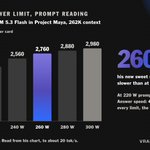
Prompt reading: power does matter. At 262K context: 2,980 tok/s at 300 W, 2,760 at 260 W, 2,220 at 220 W.
So 220 W costs about a quarter of prompt speed, not the 2 to 6% we posted from his first test. His new pick is 260 W: about 7% slower prompts for a 40 W lower cap per card.


Cap your RTX 3090s at 220 W instead of 300 W, and local LLM answers come out about as fast.
@axitek ran GLM 5.3 Flash on 7x 3090 in Project Maya at both limits, from 33K to 262K context:
Answers: 51 to 60 tok/s at both settings, no clear winner.
Prompt reading: 2 to 6% slower at 220 W.

VRAMCalculator retweeted

260w is my new sweet spot for 3090 cards in layer-split models.
When running GLM-5.3-Flash with Maya, 3090 power limits have little impact on decode, but prefill is another story - you go faster with more power, but marginally so.
Pick a curve, any curve.
HW 7x3090+128gb

Cap your RTX 3090s at 220 W instead of 300 W, and local LLM answers come out about as fast.
@axitek ran GLM 5.3 Flash on 7x 3090 in Project Maya at both limits, from 33K to 262K context:
Answers: 51 to 60 tok/s at both settings, no clear winner.
Prompt reading: 2 to 6% slower at 220 W.
How: sudo nvidia-smi -pl 220 (add -i 0 for one card). It resets when you reboot.
His model is split across the cards by layers, so each card waits its turn and rarely runs flat out. A single card, or cards working in parallel on every token, may lose more. One rig and one model so far.
Running Project Maya on 3090s? What fits your cards and RAM: vramcalculator.com/project-m…

DeepSeek V4.1 Flash 1017 is a 510 GB download. @ItsmeAjayKV runs it on one RTX 3090 with 64 GB of RAM.
Project Maya splits it three ways: the card holds the core layers and the busiest experts, RAM holds more experts, and the rest is read from the SSD as needed.
It is slow, about 4 tokens a second, but it works on a gaming PC.
Where each GB goes on your own PC, card by card and RAM size by RAM size, is what our Project Maya calculator shows.
vramcalculator.com/project-m…

Project Maya keeps getting faster every day. On a Ryzen AI Max, @PeasantSmith measured DeepSeek's Maya-S build reading prompts about 2.4x faster in 1.1.21 than two releases earlier.